News & updates

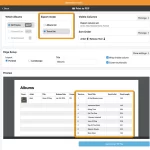 The CLZ Music Web software (and the CLZ Cloud site too), has always allowed the Printing and Exporting of album lists. However, a feature that has been frequently requested over the years, is the ability to print and export track lists.
This was technically a bit harder to accomplish, so we postponed implementing this for quite a while. But in the past few weeks, our web developer Joe sat down and made it happen anyway 🙂
And today, we released the feature to your live Web software, for both the Export to CSV tool and the Print to PDF tool.

Today, a nice server-side update that will improve the “sorting by title” for your books.
A bit of background:
Our CLZ Books mobile app and the CLZ Books Web software have always include a Sort Title field, right under the Title field in the Edit Book screen. You can use it to control the sorting of your books when the app is set to sort by Author/Title.
For example, a book titled “The Client” will sort under the “T’s” by default. But if you change the Sort Title to just “Client” (removing “The”), it will sort nicely in the C section where it belongs.
However, you needed to do that manually for all books where is was applicable.
But not anymore!

 This is it, the big v11.0 update for your CLZ Comics app. About a week later than planned, because our friends at Apple sure took their time reviewing our update 🙂 Oh well, it’s here now!
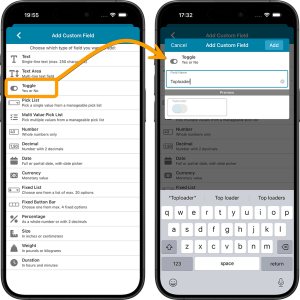
Version 11 is a huge step forward in the customizability of the app. And I am not talking about tweaking the look and feel here, like layout, colors, fonts, etc… No… this time we are giving you the ability to actually customize the database itself, with your own “Custom Fields“!
The Custom Fields feature will let you create your own data fields, to catalog any information for which the app does not have a built-in field. You can create text fields, number fields, date fields, Yes/No toggles, pick list fields and much more.
All fields you create can be edited on a special Custom Fields tab of the Edit Comic screen. The entered data will nicely appear in a special section on the comic details page. And of course, you will be able to use the fields like any built-in fields, that is, sort on them, use pick list, date and toggle fields as folders, search your text fields, etc..

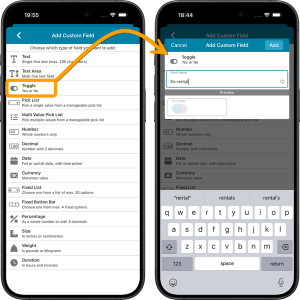 This is it, the big v11.0 update for your CLZ Movies app. Version 11 is a huge step forward in the customizability of the app. And I am not talking about tweaking the look and feel here, like layout, colors, fonts, etc… No… this time we are giving you the ability to actually customize the database itself, with your own “Custom Fields“!
The Custom Fields feature will let you create your own data fields, to catalog any information for which the app does not have a built-in field. You can create text fields, number fields, date fields, Yes/No toggles, pick list fields and much more.
All fields you create can be edited on a special Custom Fields tab of the Edit Movie screen. The entered data will nicely appear in a special section on the movie details page. And of course, you will be able to use the fields like any built-in fields, that is, sort on them, use pick list, date and toggle fields as folders, search your text fields, etc..
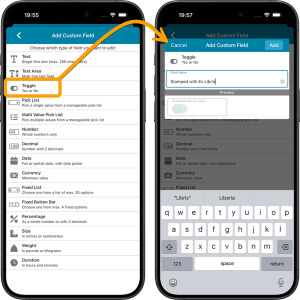 This is it, the big v11.0 update for your CLZ Books app. Version 11 is a huge step forward in the customizability of the app. And I am not talking about tweaking the look and feel here, like layout, colors, fonts, etc… No… this time we are giving you the ability to actually customize the database itself, with your own “Custom Fields“!
The Custom Fields feature will let you create your own data fields, to catalog any information for which the app does not have a built-in field. You can create text fields, number fields, date fields, Yes/No toggles, pick list fields and much more.
All fields you create can be edited on a special Custom Fields tab of the Edit Book screen. The entered data will nicely appear in a special section on the book details page. And of course, you will be able to use the fields like any built-in fields, that is, sort on them, use pick list, date and toggle fields as folders, search your text fields, etc..

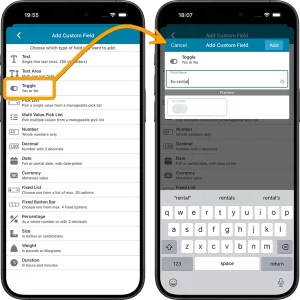
This is it, the big v11.0 update for your CLZ Games app. Version 11 is a huge step forward in the customizability of the app. And I am not talking about tweaking the look and feel here, like layout, colors, fonts, etc… No… this time we are giving you the ability to actually customize the database itself, with your own “Custom Fields“!
The Custom Fields feature will let you create your own data fields, to catalog any information for which the app does not have a built-in field. You can create text fields, number fields, date fields, Yes/No toggles, pick list fields and much more.
All fields you create can be edited on a special Custom Fields tab of the Edit Game screen. The entered data will nicely appear in a special section on the game details page. The Custom Fields are available for your games, hardware and toys. And of course, you will be able to use the fields like any built-in fields, that is, sort on them, use pick list, date and toggle fields as folders, search your text fields, etc..
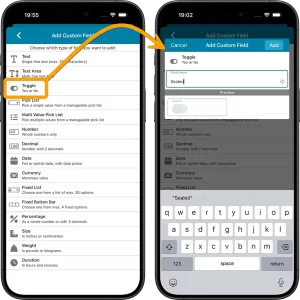 This is it, the big v11.0 update for your CLZ Music app. Version 11 is a huge step forward in the customizability of the app. And I am not talking about tweaking the look and feel here, like layout, colors, fonts, etc… No… this time we are giving you the ability to actually customize the database itself, with your own “Custom Fields“!
The Custom Fields feature will let you create your own data fields, to catalog any information for which the app does not have a built-in field. You can create text fields, number fields, date fields, Yes/No toggles, pick list fields and much more.
All fields you create can be edited on a special Custom Fields tab of the Edit Album screen. The entered data will nicely appear in a special section on the album details page. And of course, you will be able to use the fields like any built-in fields, that is, sort on them, use pick list, date and toggle fields as folders, search your text fields, etc..
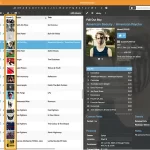 Two nice improvements for CLZ Web in one go. First, you can now add a cover thumbnail as a column in your List View. Next to that, we spent some time improving the keyboard support in the Edit screen.
On top of that, we’ve now also added the possibility to install CLZ Web “as an app” to your computer.
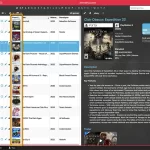 Two nice improvements for CLZ Web in one go. First, you can now add a cover thumbnail as a column in your List View. Next to that, we spent some time improving the keyboard support in the Edit screen.
On top of that, we’ve now also added the possibility to install CLZ Web “as an app” to your computer.
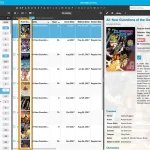 Two nice improvements for CLZ Web in one go. First, you can now add a cover thumbnail as a column in your List View. Next to that, we spent some time improving the keyboard support in the Edit screen.
On top of that, we’ve now also added the possibility to install CLZ Web “as an app” to your computer.
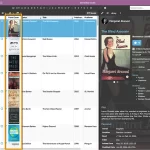 Two nice improvements for CLZ Web in one go. First, you can now add a cover thumbnail as a column in your List View. Next to that, we spent some time improving the keyboard support in the Edit screen.
On top of that, we’ve now also added the possibility to install CLZ Web “as an app” to your computer.
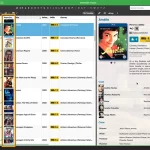 Two nice improvements for CLZ Web in one go. First, you can now add a cover thumbnail as a column in your List View. Next to that, we spent some time improving the keyboard support in the Edit screen.
On top of that, we’ve now also added the possibility to install CLZ Web “as an app” to your computer.
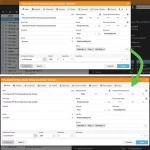 Through the years, the Edit Album screen has evolved a lot. More and more fields were added, distributed over more and more tabs. And recently even more tabs got added for the new Custom Fields and My Images features.
So it’s time to make the amount of tabs more manageable and customizable, with two subtle changes to the Edit Album screen:
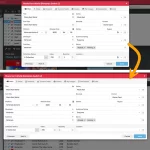 Through the years, the Edit Game screen has evolved a lot. More and more fields were added, distributed over more and more tabs. And recently even more tabs got added for the new Custom Fields and My Images features.
So it’s time to make the amount of tabs more manageable and customizable, with two subtle changes to the Edit Game screen:
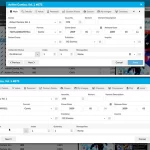 Through the years, the Edit Comic screen has evolved a lot. More and more fields were added, distributed over more and more tabs. And recently even more tabs got added for the new Custom Fields and My Images features.
So it’s time to make the amount of tabs more manageable and customizable, with two subtle changes to the Edit Comic screen:
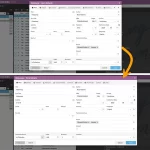 Through the years, the Edit Book screen has evolved a lot. More and more fields were added, distributed over more and more tabs. And recently even more tabs got added for the new Custom Fields and My Images features.
So it’s time to make the amount of tabs more manageable and customizable, with two subtle changes to the Edit Book screen:
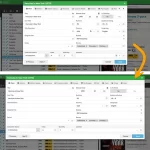 Through the years, the Edit Movie screen has evolved a lot. More and more fields were added, distributed over more and more tabs. And recently even more tabs got added for the new Custom Fields and My Images features.
So it’s time to make the amount of tabs more manageable and customizable, with two subtle changes to the Edit Movie screen:
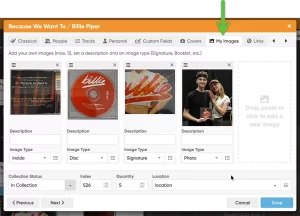 Another big update for your CLZ Music Web software today, which brings further ways to customize your album entries.
This updates adds a new My Images tab, that lets you add up to 5 extra images to each album entry! That is next to the existing customizable Front and Back cover. You can use it to store more images/photos of your collectibles, e.g. of the disc(s), the booklet, the gatefold for vinyl, the obi strip, or that signed cover, etc..
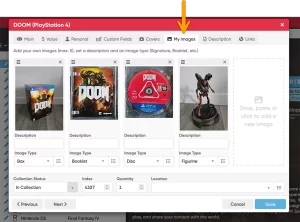 Another big update for your CLZ Games Web software today, which brings further ways to customize your games entries.
This updates adds a new My Images tab, that lets you add up to 5 extra images to each game entry! That is next to the existing customizable Front and Back cover. You can use it to store more images/photos of your collectibles, e.g. of the cartridge, the disc, the manual, the included map, or the full contents of that big special box edition?
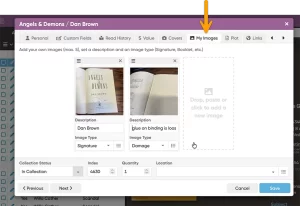 Another big update for your CLZ Books Web software today, which brings further ways to customize your book entries.
This updates adds a new My Images tab, that lets you add up to 5 extra images to each book entry! That is next to the existing customizable Front and Back cover. You can use it to store more images/photos of your collectibles, e.g. of the dust cover, the signature(s), interior art, etc..
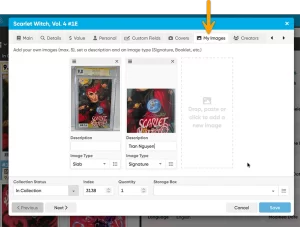 Another big update for your CLZ Comics Web software today, which brings further ways to customize your comic book entries.
This updates adds a new My Images tab, that lets you add up to 5 extra images to each comic entry! That is next to the existing customizable Front and Back cover. You can use it to store more images/photos of your collectibles, e.g. of your actual book (showing its condition/defects), or your slabbed copy, a close-up of the signature on the cover, interior art, the CoA, etc…
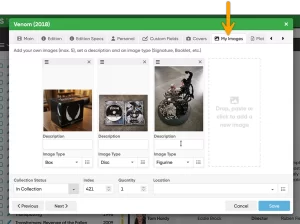 Another big update for your CLZ Movies Web software today, which brings further ways to customize your movie entries.
This updates adds a new My Images tab, that lets you add up to 5 extra images to each movie entry! That is next to the existing customizable Front and Back cover. You can use it to store more images/photos of your collectibles, e.g. of the disc(s), the inlay, the slipcover, the extras (figurines, cards, etc…).
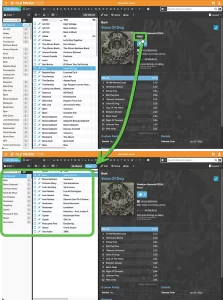 Here’s one suggested by one of our users: “why can’t we just click on a genre in the album details and then see all albums in that genre?”
That definitely makes sense, and it makes sense for a lot more fields too! So today we’re releasing a new feature which makes it much easier to move through your collection straight from the details panel: Browsing and deepdiving into your collection just became a lot more fun!
While viewing an album, you can now click on many of the fields in the details panel to instantly find all albums in your database that match that same artist, composer, genre, label, and more.
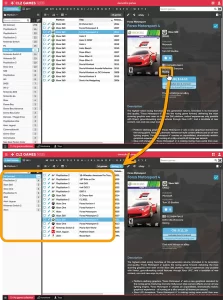 Here’s one suggested by one of our users: “why can’t we just click on a genre in the game details and then see all games in that genre?”
That definitely makes sense, and it makes sense for other fields too! So today we’re releasing a new feature which makes it much easier to move through your collection straight from the details panel: Browsing and deepdiving into your collection just became a lot more fun!
While viewing a game, you can now click on many of the fields in the details panel to instantly find all games in your database that match that same developer, platform, series, genre, and more.
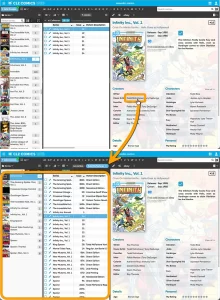 Here’s one suggested by one of our users: “why can’t we just click on creator name from a comic and then see all comics by that creator?”
That definitely makes sense, and it makes sense for other fields too! So today we’re releasing a new feature which makes it much easier to move through your collection straight from the details panel: Browsing and deepdiving into your collection just became a lot more fun!
While viewing a comic, you can now click on many of the fields in the details panel to instantly find all comics in your database that match that same character, creator, series, story arc, grading info, and more.