News & updates tagged 'clz web'

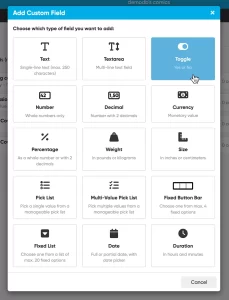 This is it, THE main feature release for 2026. A huge step forward in the customizability of the software. And I am not talking about tweaking the look and feel here, like layout, colors, fonts, etc… No… this time we are giving you the ability to actually customize the database itself!
Yep, today is the launch of the “Custom Fields” feature (previously known as “User Defined Fields”).
The Custom Fields feature will let you create your own data fields, to catalog any information for which the software does not have a built-in field. You can create text fields, number fields, date fields, Yes/No toggles, pick list fields and much more.
All fields you create can be edited on a special Custom Fields tab of the Edit screen and their data will nicely appear in a special section in the comic details panel in the main screen. And of course, you will be able to use the fields like any built-in fields, use them as columns, sort on them, use pick list fields as folders, add the fields to printed list, exports, etc..

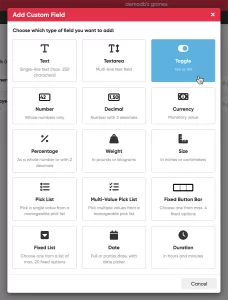 This is it, THE main feature release for 2026. A huge step forward in the customizability of the software. And I am not talking about tweaking the look and feel here, like layout, colors, fonts, etc… No… this time we are giving you the ability to actually customize the database itself!
Yep, today is the launch of the “Custom Fields” feature (previously known as “User Defined Fields”).
The Custom Fields feature will let you create your own data fields, to catalog any information for which the software does not have a built-in field. You can create text fields, number fields, date fields, Yes/No toggles, pick list fields and much more.
All fields you create can be edited on a special Custom Fields tab of the Edit screen and their data will nicely appear in a special section in the games details panel in the main screen. And of course, you will be able to use the fields like any built-in fields, use them as columns, sort on them, use pick list fields as folders, add the fields to printed list, exports, etc..

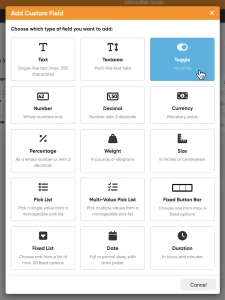 This is it, THE main feature release for 2026. A huge step forward in the customizability of the software. And I am not talking about tweaking the look and feel here, like layout, colors, fonts, etc… No… this time we are giving you the ability to actually customize the database itself!
Yep, today is the launch of the “Custom Fields” feature (previously known as “User Defined Fields”).
The Custom Fields feature will let you create your own data fields, to catalog any information for which the software does not have a built-in field. You can create text fields, number fields, date fields, Yes/No toggles, pick list fields and much more.
All fields you create can be edited on a special Custom Fields tab of the Edit screen and their data will nicely appear in a special section in the album details panel in the main screen. And of course, you will be able to use the fields like any built-in fields, use them as columns, sort on them, use pick list fields as folders, add the fields to printed list, exports, etc..

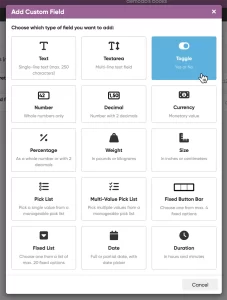 This is it, THE main feature release for 2026. A huge step forward in the customizability of the software. And I am not talking about tweaking the look and feel here, like layout, colors, fonts, etc… No… this time we are giving you the ability to actually customize the database itself!
Yep, today is the launch of the “Custom Fields” feature (previously known as “User Defined Fields”).
The Custom Fields feature will let you create your own data fields, to catalog any information for which the software does not have a built-in field. You can create text fields, number fields, date fields, Yes/No toggles, pick list fields and much more.
All fields you create can be edited on a special Custom Fields tab of the Edit screen and their data will nicely appear in a special section in the book details panel in the main screen. And of course, you will be able to use the fields like any built-in fields, use them as columns, sort on them, use pick list fields as folders, add the fields to printed list, exports, etc..

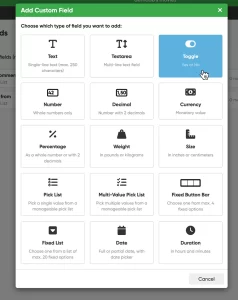 This is it, THE main feature release for 2026. A huge step forward in the customizability of the software. And I am not talking about tweaking the look and feel here, like layout, colors, fonts, etc… No… this time we are giving you the ability to actually customize the database itself!
Yep, today is the launch of the “Custom Fields” feature (previously known as “User Defined Fields”).
The Custom Fields feature will let you create your own data fields, to catalog any information for which the software does not have a built-in field. You can create text fields, number fields, date fields, Yes/No toggles, pick list fields and much more.
All fields you create can be edited on a special Custom Fields tab of the Edit screen and their data will nicely appear in a special section in the movie details panel in the main screen. And of course, you will be able to use the fields like any built-in fields, use them as columns, sort on them, use pick list fields as folders, add the fields to printed list, exports, etc..
 Are you ready for the next step in customizing your CLZ Web software?
Coming up next Monday:
Create your own Custom Fields!
The Custom Fields feature will let you create your own database fields, to catalog any information for which the software does not have a built-in field.
Fill in your custom fields on the special tab of the Edit screen and their data will nicely appear in a special section in the details panel in the main screen. And of course, you will be able to use the fields like any built-in fields, use them as columns, sort on them, use pick list fields as folders, add the fields to printed list, exports, etc..
[CLZ News] Catalog Toys-to-Life with CLZ Games, improved details panels in CLZ Web
 This is CLZ Alwin, with your CLZ News for June 2025.
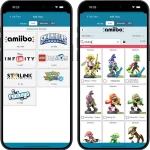
THE big release this month was of course the long awaited Toys-to-Life (TtL) support in CLZ Games web and mobile. You can now finally catalog your amiibo, Skylanders, Disney Infinity and other TtL figures.
This whole TtL endeavour took quite a bit longer than anticipated. Lots of work on our own Core TtL database, modifying the cloud database and CLZ Games Web software, creating server side endpoints for the mobile apps to access that, then finally adding all the new features to the CLZ Games mobile apps, including the cool new (for us) technology of adding toys by scanning the figure’s NFC tag with your mobile device.
But… it is all finally here and early feedback has been awesome!
The other update this month is basically an extension of last month’s “more compact” update of the CLZ Web software, as we continued our re-design work, focusing on the “details panels” of all five CLZ Web flavors. You know, the area of the screen where it shows all information of the selected movie, comic, book, etc…
Read on below to find out what has changed.
With all that out of the way, our mobile and web developers are continuing on the “new fields” project for CLZ Music, and… we started 3 other projects too. Check out the “Coming up” section below:
The topics today:
- Now live: CLZ Games mobile and web: Catalog your amiibo, Skylanders, etc..
- Now live: CLZ Web, improved design, layout and performance for item details panels.
- Coming up: CLZ Music updates with new fields (listening history, matrix nrs, etc.)
- Coming up: CLZ Movies updates with new fields (editable discs/episodes, watch history, etc..)
- Coming up: CLZ Comics 10.3: Improved adding by Cover and by Barcode
- Coming up: automatic eBay search links for CLZ Web
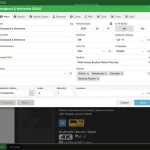 We are currently working on a re-design of the CLZ Web cloud-based software, with a more modern and more “compact” look.
The main goal is to make the user interface (toolbars, etc..) more compact, so that more screen estate is freed up for your actual collection data. More collection items on screen, more folders on screen.
Also, this will make the CLZ Web software more usable on smaller laptop screens.
Today I can show you a sneak preview of the first area we tackled: the Edit screens.