News & updates tagged 'udf'
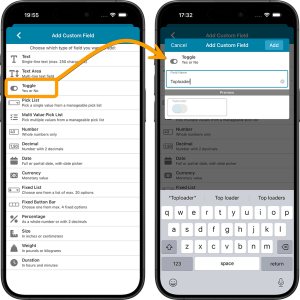 This is it, the big v11.0 update for your CLZ Comics app. About a week later than planned, because our friends at Apple sure took their time reviewing our update 🙂 Oh well, it’s here now!
Version 11 is a huge step forward in the customizability of the app. And I am not talking about tweaking the look and feel here, like layout, colors, fonts, etc… No… this time we are giving you the ability to actually customize the database itself, with your own “Custom Fields“!
The Custom Fields feature will let you create your own data fields, to catalog any information for which the app does not have a built-in field. You can create text fields, number fields, date fields, Yes/No toggles, pick list fields and much more.
All fields you create can be edited on a special Custom Fields tab of the Edit Comic screen. The entered data will nicely appear in a special section on the comic details page. And of course, you will be able to use the fields like any built-in fields, that is, sort on them, use pick list, date and toggle fields as folders, search your text fields, etc..

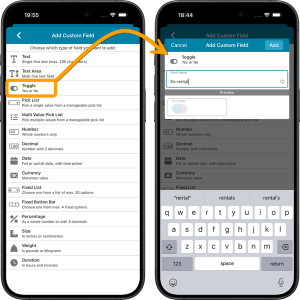 This is it, the big v11.0 update for your CLZ Movies app. Version 11 is a huge step forward in the customizability of the app. And I am not talking about tweaking the look and feel here, like layout, colors, fonts, etc… No… this time we are giving you the ability to actually customize the database itself, with your own “Custom Fields“!
The Custom Fields feature will let you create your own data fields, to catalog any information for which the app does not have a built-in field. You can create text fields, number fields, date fields, Yes/No toggles, pick list fields and much more.
All fields you create can be edited on a special Custom Fields tab of the Edit Movie screen. The entered data will nicely appear in a special section on the movie details page. And of course, you will be able to use the fields like any built-in fields, that is, sort on them, use pick list, date and toggle fields as folders, search your text fields, etc..
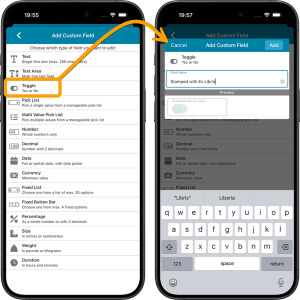 This is it, the big v11.0 update for your CLZ Books app. Version 11 is a huge step forward in the customizability of the app. And I am not talking about tweaking the look and feel here, like layout, colors, fonts, etc… No… this time we are giving you the ability to actually customize the database itself, with your own “Custom Fields“!
The Custom Fields feature will let you create your own data fields, to catalog any information for which the app does not have a built-in field. You can create text fields, number fields, date fields, Yes/No toggles, pick list fields and much more.
All fields you create can be edited on a special Custom Fields tab of the Edit Book screen. The entered data will nicely appear in a special section on the book details page. And of course, you will be able to use the fields like any built-in fields, that is, sort on them, use pick list, date and toggle fields as folders, search your text fields, etc..
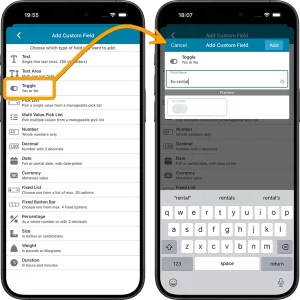
This is it, the big v11.0 update for your CLZ Games app. Version 11 is a huge step forward in the customizability of the app. And I am not talking about tweaking the look and feel here, like layout, colors, fonts, etc… No… this time we are giving you the ability to actually customize the database itself, with your own “Custom Fields“!
The Custom Fields feature will let you create your own data fields, to catalog any information for which the app does not have a built-in field. You can create text fields, number fields, date fields, Yes/No toggles, pick list fields and much more.
All fields you create can be edited on a special Custom Fields tab of the Edit Game screen. The entered data will nicely appear in a special section on the game details page. The Custom Fields are available for your games, hardware and toys. And of course, you will be able to use the fields like any built-in fields, that is, sort on them, use pick list, date and toggle fields as folders, search your text fields, etc..

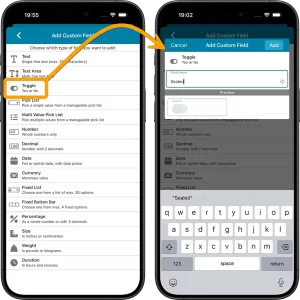 This is it, the big v11.0 update for your CLZ Music app. Version 11 is a huge step forward in the customizability of the app. And I am not talking about tweaking the look and feel here, like layout, colors, fonts, etc… No… this time we are giving you the ability to actually customize the database itself, with your own “Custom Fields“!
The Custom Fields feature will let you create your own data fields, to catalog any information for which the app does not have a built-in field. You can create text fields, number fields, date fields, Yes/No toggles, pick list fields and much more.
All fields you create can be edited on a special Custom Fields tab of the Edit Album screen. The entered data will nicely appear in a special section on the album details page. And of course, you will be able to use the fields like any built-in fields, that is, sort on them, use pick list, date and toggle fields as folders, search your text fields, etc..
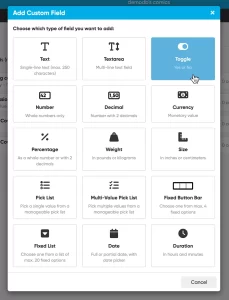 This is it, THE main feature release for 2026. A huge step forward in the customizability of the software. And I am not talking about tweaking the look and feel here, like layout, colors, fonts, etc… No… this time we are giving you the ability to actually customize the database itself!
Yep, today is the launch of the “Custom Fields” feature (previously known as “User Defined Fields”).
The Custom Fields feature will let you create your own data fields, to catalog any information for which the software does not have a built-in field. You can create text fields, number fields, date fields, Yes/No toggles, pick list fields and much more.
All fields you create can be edited on a special Custom Fields tab of the Edit screen and their data will nicely appear in a special section in the comic details panel in the main screen. And of course, you will be able to use the fields like any built-in fields, use them as columns, sort on them, use pick list fields as folders, add the fields to printed list, exports, etc..
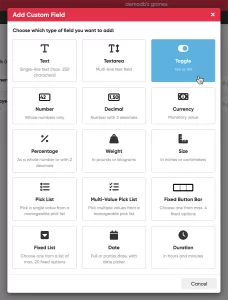 This is it, THE main feature release for 2026. A huge step forward in the customizability of the software. And I am not talking about tweaking the look and feel here, like layout, colors, fonts, etc… No… this time we are giving you the ability to actually customize the database itself!
Yep, today is the launch of the “Custom Fields” feature (previously known as “User Defined Fields”).
The Custom Fields feature will let you create your own data fields, to catalog any information for which the software does not have a built-in field. You can create text fields, number fields, date fields, Yes/No toggles, pick list fields and much more.
All fields you create can be edited on a special Custom Fields tab of the Edit screen and their data will nicely appear in a special section in the games details panel in the main screen. And of course, you will be able to use the fields like any built-in fields, use them as columns, sort on them, use pick list fields as folders, add the fields to printed list, exports, etc..
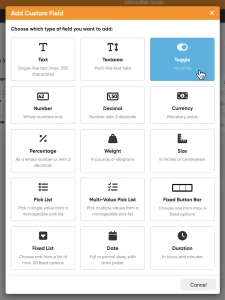 This is it, THE main feature release for 2026. A huge step forward in the customizability of the software. And I am not talking about tweaking the look and feel here, like layout, colors, fonts, etc… No… this time we are giving you the ability to actually customize the database itself!
Yep, today is the launch of the “Custom Fields” feature (previously known as “User Defined Fields”).
The Custom Fields feature will let you create your own data fields, to catalog any information for which the software does not have a built-in field. You can create text fields, number fields, date fields, Yes/No toggles, pick list fields and much more.
All fields you create can be edited on a special Custom Fields tab of the Edit screen and their data will nicely appear in a special section in the album details panel in the main screen. And of course, you will be able to use the fields like any built-in fields, use them as columns, sort on them, use pick list fields as folders, add the fields to printed list, exports, etc..
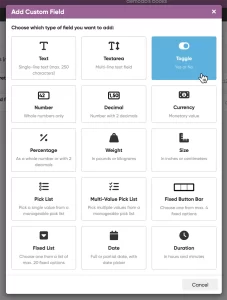 This is it, THE main feature release for 2026. A huge step forward in the customizability of the software. And I am not talking about tweaking the look and feel here, like layout, colors, fonts, etc… No… this time we are giving you the ability to actually customize the database itself!
Yep, today is the launch of the “Custom Fields” feature (previously known as “User Defined Fields”).
The Custom Fields feature will let you create your own data fields, to catalog any information for which the software does not have a built-in field. You can create text fields, number fields, date fields, Yes/No toggles, pick list fields and much more.
All fields you create can be edited on a special Custom Fields tab of the Edit screen and their data will nicely appear in a special section in the book details panel in the main screen. And of course, you will be able to use the fields like any built-in fields, use them as columns, sort on them, use pick list fields as folders, add the fields to printed list, exports, etc..
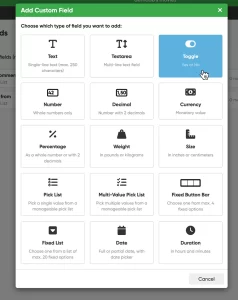 This is it, THE main feature release for 2026. A huge step forward in the customizability of the software. And I am not talking about tweaking the look and feel here, like layout, colors, fonts, etc… No… this time we are giving you the ability to actually customize the database itself!
Yep, today is the launch of the “Custom Fields” feature (previously known as “User Defined Fields”).
The Custom Fields feature will let you create your own data fields, to catalog any information for which the software does not have a built-in field. You can create text fields, number fields, date fields, Yes/No toggles, pick list fields and much more.
All fields you create can be edited on a special Custom Fields tab of the Edit screen and their data will nicely appear in a special section in the movie details panel in the main screen. And of course, you will be able to use the fields like any built-in fields, use them as columns, sort on them, use pick list fields as folders, add the fields to printed list, exports, etc..
 Are you ready for the next step in customizing your CLZ Web software?
Coming up next Monday:
Create your own Custom Fields!
The Custom Fields feature will let you create your own database fields, to catalog any information for which the software does not have a built-in field.
Fill in your custom fields on the special tab of the Edit screen and their data will nicely appear in a special section in the details panel in the main screen. And of course, you will be able to use the fields like any built-in fields, use them as columns, sort on them, use pick list fields as folders, add the fields to printed list, exports, etc..
Fixed:
- Various “Access Violation” errors fixed in the Link Comics screen
- User Defined Fields: default values weren’t used when adding comics
- Pre-fill: User Defined Fields weren’t remembered between sessions
- Light Skin: Rating stars weren’t visible
Fixed:
- Various “Access Violation” errors fixed in the Link Movies screen
- User Defined Fields: default values weren’t used when adding movies
- Pre-fill: User Defined Fields weren’t remembered between sessions
- Light Skin: Rating stars weren’t visible
Fixed:
- Various “Access Violation” errors fixed in the Link Albums screen
- User Defined Fields: default values weren’t used when adding albums
- Pre-fill: User Defined Fields weren’t remembered between sessions
- Light Skin: Rating stars weren’t visible
Fixed:
- Add books: When adding books to “Sold” the button wasn’t showing text
- Various “Access Violation” errors fixed in the Link Books screen
- User Defined Fields: default values weren’t used when adding books
- Pre-fill: User Defined Fields weren’t remembered between sessions
- Light Skin: Rating stars weren’t visible
Fixed:
- Add Games: the value wasn’t shown in the result cells (you may need to switch your completeness from CIB to New and back in pre-fill settings 1 time to make them show up!)
- Sync with CLZ Cloud: Date Added wasn’t syncing
- Pre-fill: You can now use the field “Original” as a pre-fill field
- Pick list popups: Add button contained bad text
- Various “Access Violation” errors fixed in the Link Games screen
- User Defined Fields: default values weren’t used when adding games
- Pre-fill: User Defined Fields weren’t remembered between sessions
- Light Skin: Rating stars weren’t visible
Fixed:
- Edit Comic:
- On User Defined Fields tab, “_[Add pick list item]_” didn’t work for comboboxes
- Changing the role for a credit would mark all comics dirty where that person appeared instead of just the edited comic
- person grids: adding a person with a display name that existed multiple times, would sometimes save the wrong one
- Manage Pick Lists: removing pick list items didn’t mark their corresponding comics as modified
- Main Screen: accelerator keys in main menu (like “ALT+F” for files menu) didn’t work
- Update File Links: Story front cover paths were not updated properly
Fixed:
- Main Screen: a double hint was showing for the thumbnail slider to resize thumbnails in Images View
- Cloud Sync: log messages weren’t showing any more
- User Defined Fields: values of check box lists were not loaded correctly in some cases

v16.3.7: Maintenance build with improvements to the main screen and more
Fixed:
- Main Screen:
- The folder tree was wrapping the values in the list
- A double hint was showing for the thumbnail slider to resize thumbnails in Images View
- When working offline, closing the program could cause Access Violations
- User Defined Fields: values of check box lists were not loaded correctly in some cases

v16.3.8: Maintenance build with improvements to the main screen and more
Fixed:
- Main Screen:
- The folder tree was wrapping the values in the list
- A double hint was showing for the thumbnail slider to resize thumbnails in Images View
- When working offline, closing the program could cause Access Violations
- Edit Comic:
- It was possible to sort the stories list where it shouldn’t which caused drawing issues
- Moving story up or down could make selected story look empty
- User Defined Fields: values of check box lists were not loaded correctly in some cases

v16.0.6: New menu option to open database location and some fixes
Fixed:
- User Defined Fields for Stories were not saved
- Full Covers Template: Subtitle was not spaced correctly
- New Maintenance tool: Tools > Maintenance > Open database location
- Automatically Close Add Auto screen after queue is emptied was not working
- List Sorting: Empty values were not sorted correctly
- Pseudonym can not be selected in “Manage Pick List” screen if a quick search has been done.
New:
- New Maintenance tool: Tools > Maintenance > Open database location
- Add Auto/Update Settings: Include links from Collectorz Core
Fixed:
- Add Auto: QuickFill: Collection Status wasn’t set correctly
- Stories UDF were not saved
- Sort by Series Column: now it sorts the Series Issues too
- Template: Links section fixed