
 Are you ready for the next step in customizing your CLZ Web software?
Coming up next Monday:
Create your own Custom Fields!
The Custom Fields feature will let you create your own database fields, to catalog any information for which the software does not have a built-in field.
Fill in your custom fields on the special tab of the Edit screen and their data will nicely appear in a special section in the details panel in the main screen. And of course, you will be able to use the fields like any built-in fields, use them as columns, sort on them, use pick list fields as folders, add the fields to printed list, exports, etc..
Sneak preview screenshot
Full details will be disclosed on Monday, but for now, here’s a sneak preview screenshot:
Available Field Types
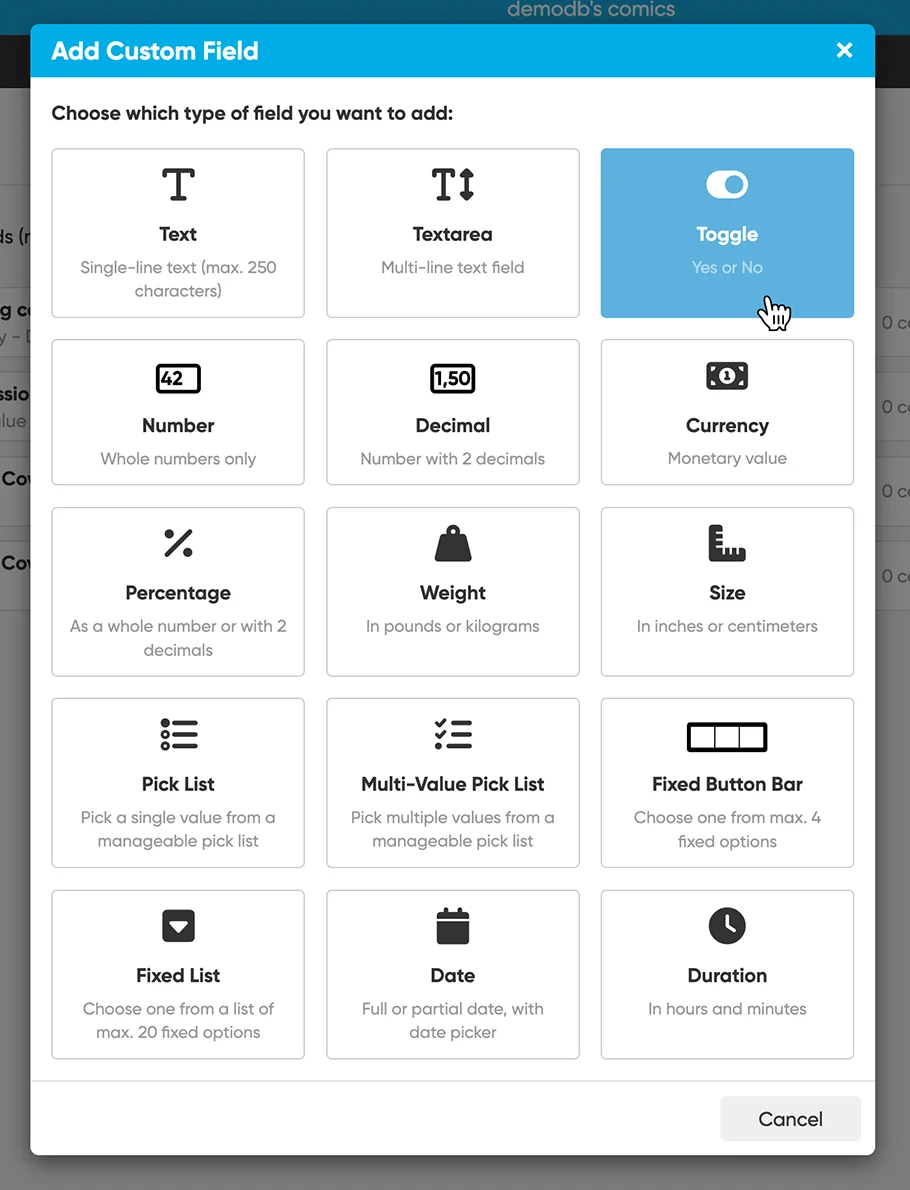
Using the Manage Custom Fields screen, you can create text fields, number fields, date fields, Yes/No toggles, etc.. you can even create your own single value and multi-value pick list fields!
These are all the available field types:
I will be back on Monday, once everything is live in your software!