News & updates
 The end of the month is close, so it’s time to look back on May 2026, with the CLZ Newsletter.
We’re on a roll with the CLZ Web web-based editions. Two big updates for all five Web flavors this month, one focused on customizing your database entries (add more images, other than just front and back), the other is about customizing the software itself (you can now change the order of the the Edit screen tabs).
And our web developers have already started on more improvements for the CLZ Web software, some smaller tweaks this time (more info below).
On the mobile side of CLZ, it is still all about implementing the Custom Fields feature. Complex and time-consuming, both in back-end and UI-design. Pim, Bernard and AJ are making good progress, but we feel a release is still two months away.
It will all be totally worth it though, as this is THE biggest feature we every built, for Web and Mobile.
The newsletter topics today:
- CLZ Web: Add more images to your entries
- CLZ Web: Wider Edit screens, with customizable tab order
- What’s cooking?
- CLZ mobile apps: Create (and Sync!!) your own Custom Fields
- CLZ Web: print detail pages, one item per page
- CLZ Music Web: print track lists
- CLZ Web: add a cover thumbnail to you List View
CLZ Web: Add more images to your entries
Early this month, we released a big update for the CLZ Web software, which brings further ways to customize your entries.
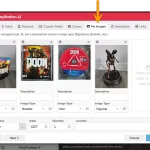
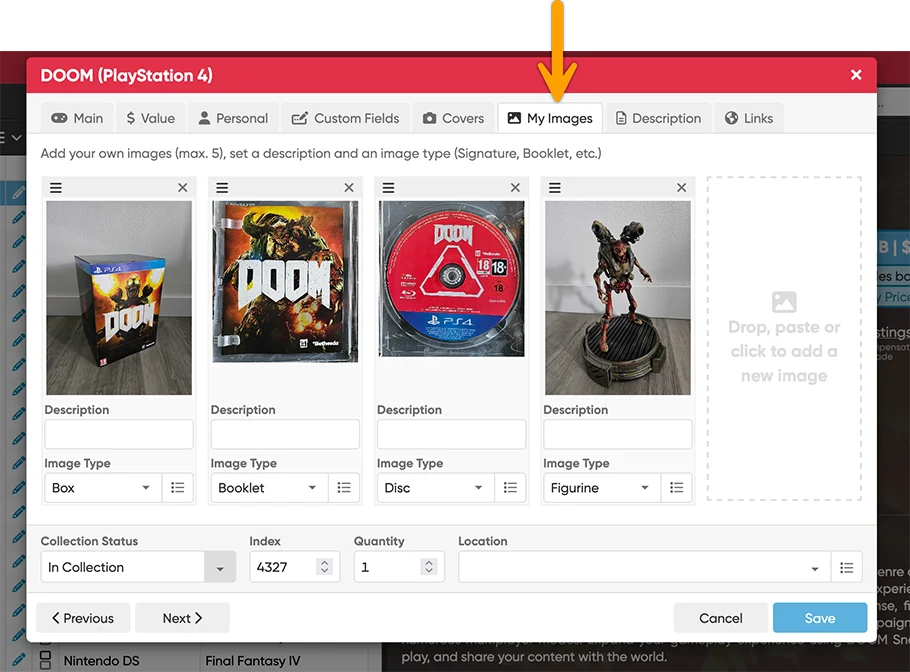
This updates adds a new My Images tab, that lets you add up to 5 extra images to each entry! That is next to the existing customizable Front and Back cover. You can use it to store more images/photos of your collectibles, e.g. of the disc(s), the inlay, the the game cartridge, slipcover, internal art, etc….
Just open an item in the Edit screen and switch to the new “My Images” tab.
You can add a maximum of 5 extra images per item. Either:
- Drop an image file from your computer
- Paste an image from your clipboard
- Or click the empty slot to pick an image file from your computer
Drag and drop the image cards to re-order them. You can also crop and rotate the images.
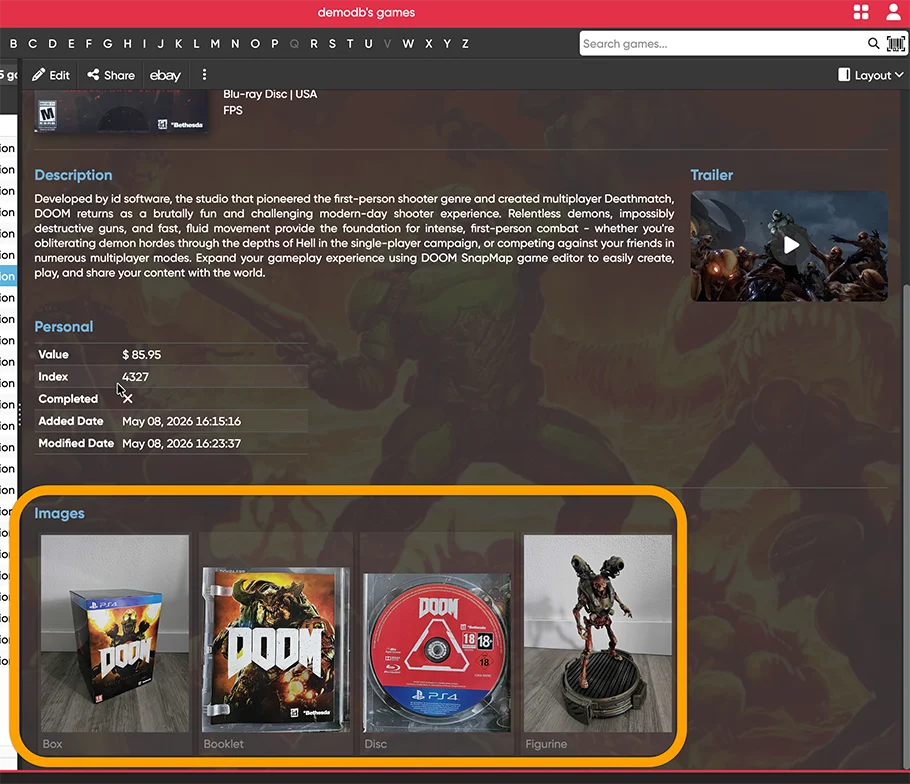
In the software’s main screen, your added extra images will appear in the Details panel at the bottom. Click any image to see a larger version, then use the left and right arrow keys on your keyboard to flip through all images for that movie.
For screenshots per app, go here:
CLZ Movies Web / CLZ Games Web / CLZ Comics Web / CLZ Music Web / CLZ Books Web
What CLZ Web users told us about the extra images:
Anthony Sloderbeck:
“I’ve been using CLZ for a while now, and loving it. The only knock I had against it was that there was no way of adding extra images (overview, poster, etc.). Thank you, thank you!”
Pierre Spicher:
“Hello, thank you—this is great! The custom fields, sorting by filter, and now the ability to add additional photos— it’s just perfect for me. I’m really happy with it.
Thanks again for all these new features and those to come…”
Daniel Wiercioch:
“I look forward to announcements like these. Once again, you have created something I have wanted for a long time. I have often had to choose between the standard cover (which comes with every DVD I own) and the slipcover (that only comes with some of them). In the past, I had to choose one or the other. Now I have a way to capture them both with room left over for other things, too!”
Stephen Olsen:
“Thank you so much for this update. Previously when adding new entries to my music database, I have found additional images on the web that I would liked to have included to the entry; with this new update I can do that, so again thank you to you and your team.”
David Lambkin:
“Thank you for expanding the number of images that can be added to a specific entry in CLZ Books. I have an extensive collection of rare and collectible books. I contacted you a while back because for inventory purposes, it was necessary to capture the book cover, publication page, signature page (for signed editions) and the slip/tray cases. This couldn’t be done with the old software so I would have to use Photoshop to combine multiple images into one before they could be entered. Needless to say, this was a burdensome process. Now, I can enter each photo in just one step. Again, Thanks!”
CLZ Web: Wider Edit screens, with customizable tab order
Through the years, the Edit screen has evolved a lot. More and more fields were added, distributed over more and more tabs. And recently even more tabs got added for the new Custom Fields and My Images features.
So it’s time to make the amount of tabs more manageable and customizable, with two subtle changes to the Edit screen:
Wider Edit screen
First, to make more edit screen tabs visible without scrolling, the Edit screen now better adapts to wider browser windows. If your screen is wide enough, the layout will expand to show more (or even all) tabs and wider edit boxes.
Customize your tab order
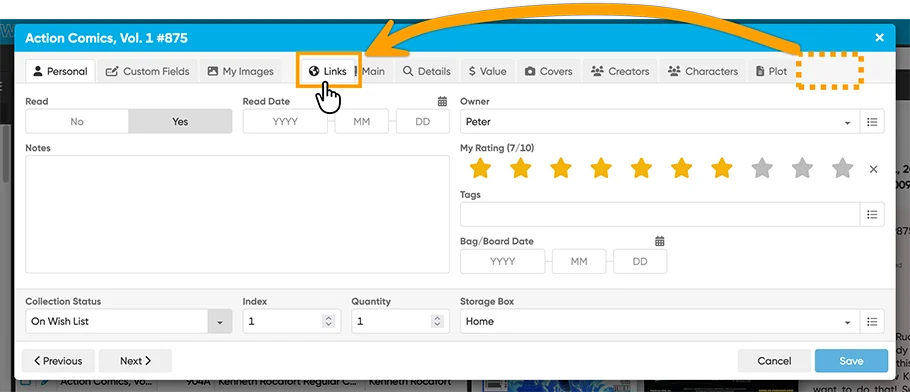
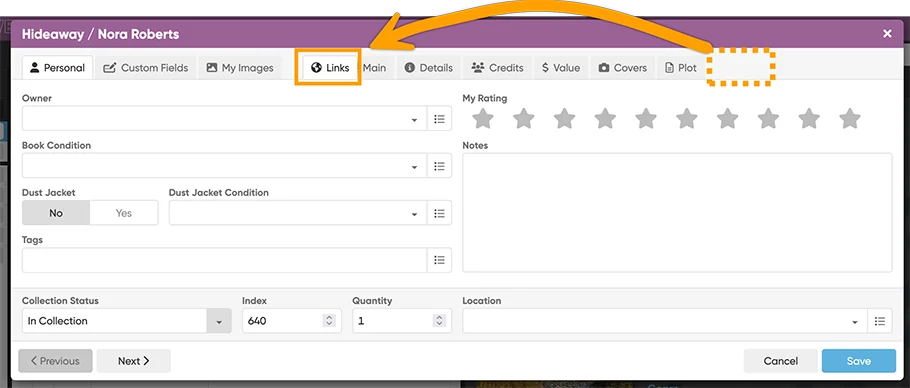
It is now possible to change the order of the Edit screen tabs. You can make it start with the tabs that you use the most and move your unused tabs to the far right. Just drag the tabs to re-order them. Of course, your chosen order is remembered automatically.
For screenshots and demo videos of the new edit screens, go here:
CLZ Movies Web / CLZ Games Web / CLZ Comics Web / CLZ Music Web / CLZ Books Web
What CLZ Web users told us about the improved Edit screens:
Sbender:
“I love the ease of rearrange the tabs and how they stay in place for the next book. Thank you.”
Berend:
“This is great .. being able to shift the tabs to wherever you want them. This product is getting better all the time. My thanks to all the team for the impressive work done so far, and for the willingness to listen to what the users have to say.”
Tunestomesandfur:
“This is so great, thank you! I especially love being able to move the tabs around. This is going to make those big projects so much easier. This product and it’s team continue to impress me”
Norman M. Golden:
“The Wider Edit screen is nice, although I have an UltraWide monitor, so I don’t have to worry about seeing all the tabs. What does excite me is the movable tabs”
What’s cooking?
CLZ mobile apps: Create (and Sync!!) your own Custom Fields
Alas, this is still not finished. The CLZ mobile team Pim, Bernard and AJ are making good progress, but it is a complex piece of coding and also simple a lot of work. The Custom Fields feature affects many areas of the app.
Short summary of what is is: the Custom Fields feature will let you create your own fields. Many field types are support, like Text, Yes/No, Date, Currency, etc… you will even be able to create your own single value and multi-value pick list fields!
Once the Custom Fields are live for the mobile, you will be able to sync your custom field definitions and their data back and forth between Web and Mobile!
ETA: within two months.
CLZ Web: print detail pages, one item per page
Currently, CLZ Web’s Print to PDF tool only lets you print items list, one item per row, with configurable columns. A common request is to print “one item per page”, with full item details. So that’s what we are planning to add soon.
CLZ Music Web: print track lists
A frequest request for the CLZ Web flavor for music is to print track list. Currently, it only lets you print albums list. So we are going to try and make this possible. No guarantees it will work, because it’s complex and may generate performance problems.
CLZ Web: add a cover thumbnail to you List View
This is not a common request, but recently one interested trial user was really really surprised this wasn’t possible. We liked the idea though, so let’s see what we can do here.
Enjoy!