News & updates
 This is Alwin, from CLZ, bringing you our monthly news for March 2026. Most of the dev team is caught up in big undertakings at the moment, so that means very few updates this month.
Mobile developers Pim and Bernard are implementing the huge Custom Fields feature for the mobile app. Web developer Joe is adding the ability to add more images for the CLZ Web software. Web developer Michiel is “making more things clickable” in the CLZ Web details panels (I’ll explain below, under What’s Cooking).
Finally… lead developer Sven is doing early research into some cool feature ideas we have. Yeah, I know, that is even more vague, but it’s all I can say at the moment. Will tell you more once I know more!
So for today, two updates and a long What’s Cooking section:
- CLZ mobile apps: Faster down syncing from CLZ Cloud
- CLZ Games Web: Add your own YouTube trailer links
- What’s cooking?
- CLZ Games mobile app: Add your own YouTube trailer links
- CLZ Web: Making more things “clickable”
- CLZ Web: Add more images to your entries (next to front and back)
- CLZ mobile apps: Create (and Sync!!) your own Custom Fields
CLZ mobile apps: Faster down syncing from CLZ Cloud
This week, we are going to release 5 updates for all 5 CLZ mobile apps.
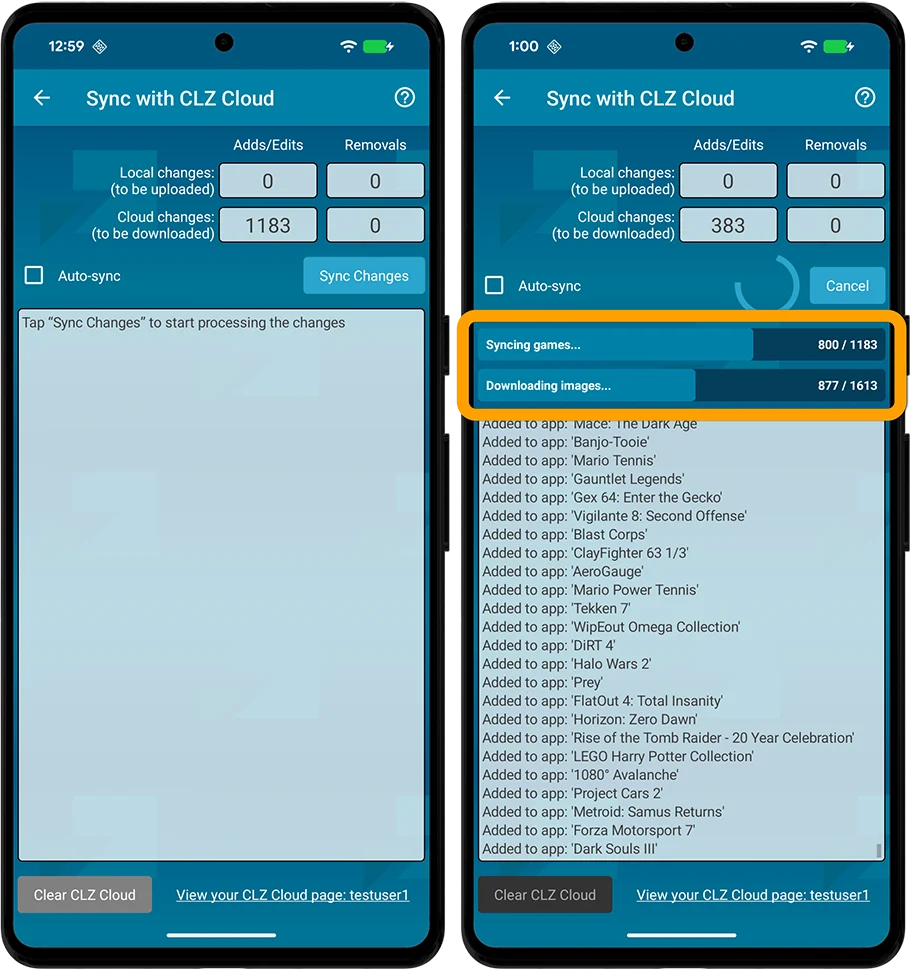
No new features here, but an important improvement to an existing one: the CLZ Cloud syncing. Our mobile developers Pim and Bernard have implemented three changes that will make the down-syncing of new items from the CLZ Cloud to your app a LOT faster!
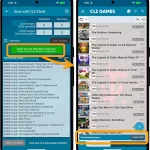
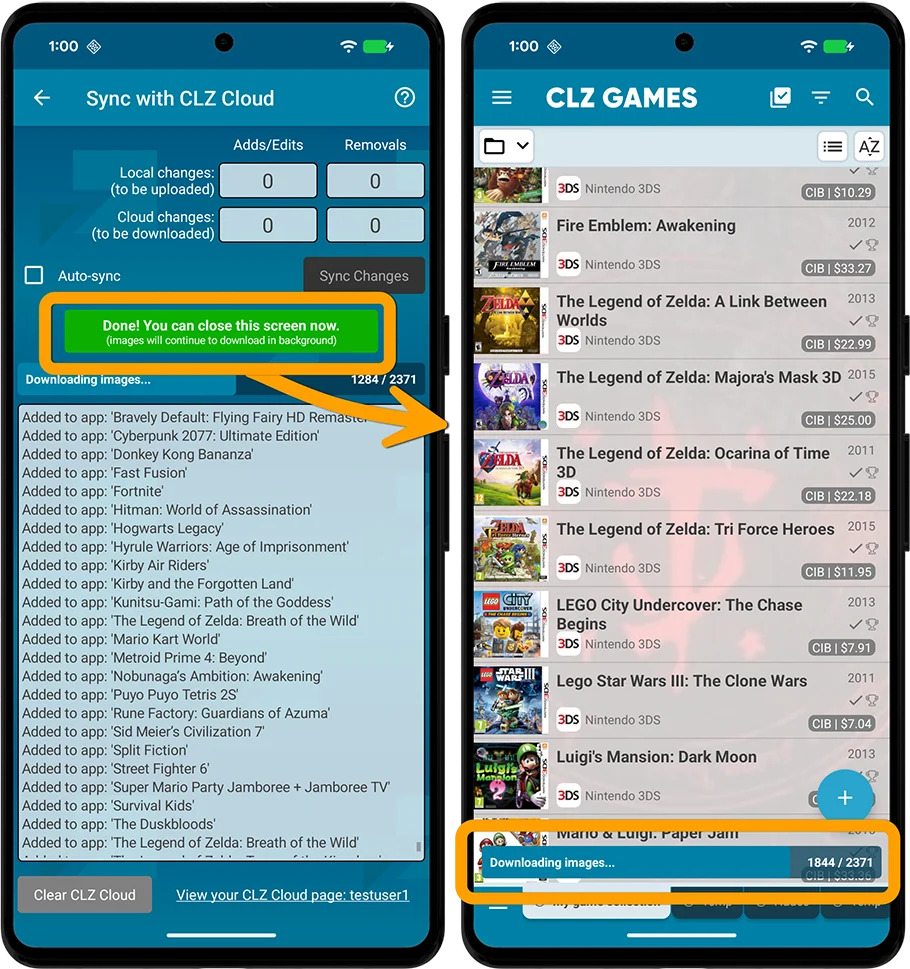
- The syncing now down-syncs the *data* first, while queuing the *image* downloads. This will make the data sync super fast.
- Downloading the images is much quicker too, especially on fast connections, as it downloads multiple images at the same time.
- As soon as the data download has completed, you can close the Sync screen and start using the app. The image downloads will continue at the bottom of the main screen, prioritising images that are “in view”.
The improvement in speed will be most noticeable when re-downloading your complete CLZ Cloud database, e.g.
- After installing the app on a new device
- After removing and re-installing the app
- After Clearing the Database
However, even during normal use, e.g. when syncing between devices, or between the app and the CLZ Web software, you will find the down-syncing to be much faster than before.
This update is now live for CLZ Music and CLZ Games. Coming up for CLZ Movies, CLZ Movies and CLZ Comics.
Some screenshots:
CLZ Games / CLZ Music
CLZ Games Web: Add your own YouTube trailer links
A handy update for CLZ Games Web!
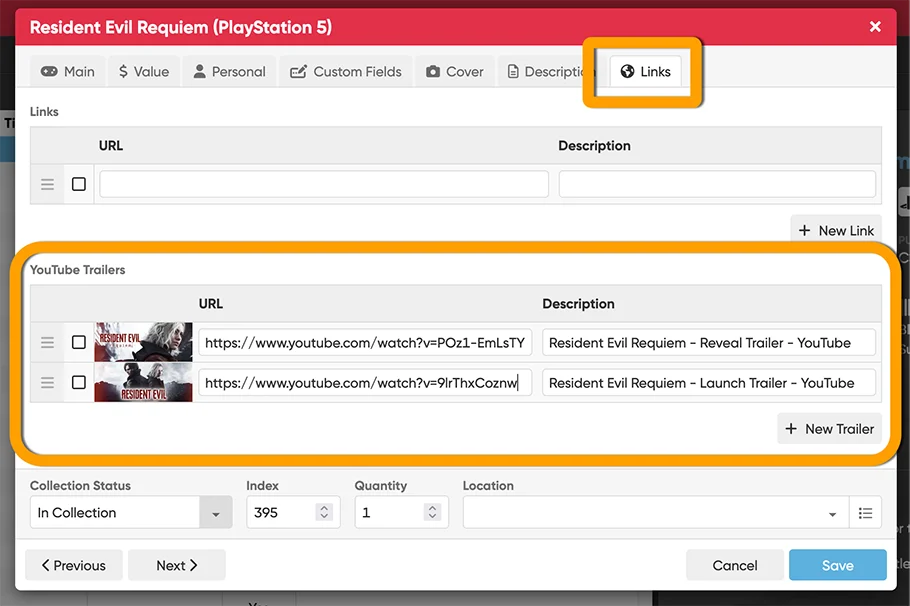
YouTube trailers for games typically come straight from our Core database, but now you can replace the standard Core YouTube trailer with a trailer of your own choice, or add one if the CLZ Core didn’t provide one.
Just paste any YouTube URL into your the YouTube trailer link section (Edit Game, then click the Links tab) and CLZ Games Web automatically grabs the thumbnail image and video description for you.
Add as many as you like per game, then drag them into your preferred order.
You can find a screenshot here
What’s cooking?
CLZ Games mobile app: Add your own YouTube trailer links
Of course, the customizable Youtube trailers feature we just introduced for CLZ Games Web, is also coming to the CLZ Games mobile app. In fact, the feature has already been implemented by our mobile app developers Pim and Bernard and are ready to be tested in-house. Should go live within a week!
CLZ Web: Making more things “clickable”
Web developer Michiel is working on Details Panel updates for all five flavors of the Web software. You know, the details panel is the area (usually on the bottom right), where it shows the full details of the selected collectible.
In that area, we are making more things into clickable links that automatically perform a search or filter on that value. Sounds a bit abstract, I know, so let me give you some examples:
In CLZ Movies Web: click an actor name in the Cast list and the software will automatically filter your movie list to show all movies with that actor.
In CLZ Comics Web: click the name of a creator and it will show all comics in your collection that they worked on.
Click a Tag and see all items with that Tag? Click genres to filter by that genre? The possibilites are endless.
We will start by making actors, directors and creators clickable, then proceed with other fields for which it makes sense.
CLZ Web: add more images to your entries
After the launch of the Custom Fields, this is the next step customizing your database entries: the ability to add more images, next to the Front and Back covers.
Of course, this will come to the mobile apps too, including full syncing of your custom images!
CLZ mobile apps: Create (and Sync!!) your own Custom Fields
Last month we introduced the Custom Fields feature for the CLZ Web web-based software. But… it is also coming to the CLZ mobile apps! Pim and Bernard are already working on this, but it is a big one. ETA: June?
Once Custom Fields are live for the mobile, you will be able to sync your custom field definitions and their data back and forth between Web and Mobile!
Enjoy!