
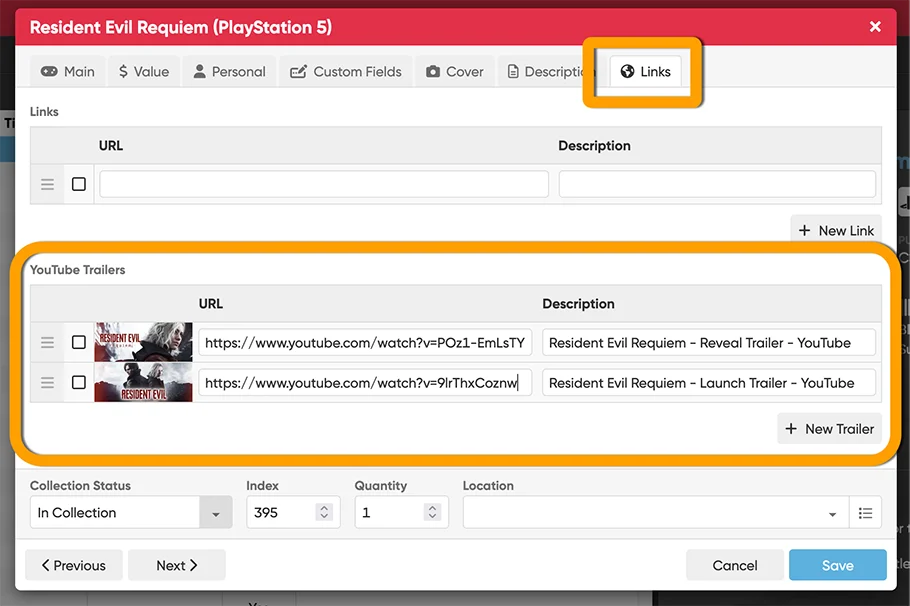
 A handy update for CLZ Games Web! YouTube trailers for games typically come straight from our Core database, but now you can replace the standard Core YouTube trailer with a trailer of your own choice, or add one if we Core didn’t provide one.
Just paste any YouTube URL into your the YouTube trailer link section (Edit Game, then click the Links tab) and CLZ Games Web automatically grabs the thumbnail image and video description for you.
Add as many as you like per game, then drag them into your preferred order.
Recent changes
Add cover thumbnails to your List View / Better keyboard support
Jun 22, 2026
Wider Edit Game screen, with customizable tab order
May 19, 2026
Add more images to your games
May 11, 2026
Easily filter your games by clicking hyperlinks
Apr 23, 2026
New: Add your own YouTube trailer links
Mar 16, 2026
Create your own Custom Fields!
Feb 23, 2026
Further tweaks to eBay links
Jul 24, 2025
Automatic eBay search links
Jul 08, 2025
Game details panel: improved design, layout and performance
Jun 20, 2025
Catalog your Toys-to-Life figures: amiibo, Skylanders, Disney Infinity, etc…
Jun 10, 2025
More compact design and layout: fit more games on screen
May 27, 2025
Improved Add Games screen
Dec 17, 2024
New “search for…” suggestions when adding games by title
Aug 01, 2024
Re-design of the “Unrecognized Barcode” screen
Jul 31, 2024
New platform picker in Add Games screen
Jul 16, 2024
Improved search behaviour
May 24, 2024
Improved managing and editing of pick list fields
Apr 08, 2024
Connect is now available in Swedish!
Feb 21, 2024
Connect is now available in Danish!
Jan 30, 2024
Improvements to the Collections and Edit Multiple features
Nov 20, 2023
Complete re-design of Edit Multiple feature
Oct 30, 2023
Pre-fill screen: Orange highlights and a Clear button
Oct 30, 2023
Improved search results in the Link with Core screen
Oct 12, 2023
Connect is now available in French, Spanish and Hungarian!
Sep 29, 2023
Improved Import from CSV/TXT screen
Aug 16, 2023