News & updates
[CLZ News] Custom Fields for CLZ Web / CLZ Books app: Track your Reading History
 Hi all, this is Alwin from CLZ, with the Feb ’26 edition of the CLZ Newsletter. And it’s an important one, because this month we launched the biggest new feature since a long time, maybe the biggest in CLZ history:
Create your own Custom Fields in the CLZ Web web-based software!
Yep, it is finally here, we finished the project that we procrastinated on for many many years, not only because of the size and the amount of work, but mainly because of its sheer complexity.
But after many brainstorm sessions with the entire tech team (web and mobile), we came up with a technical solution that works. Then began months of development work for the web team. And then weeks of testing. And now, the Custom Fields are live for all 5 flavors of the CLZ Web web-based software. Check out the full details below (with screenshot links!).
And yet, that is not the only release this month. We were also able to finally release the announced update for the CLZ Books mobile app, with the Reading History capabilities.
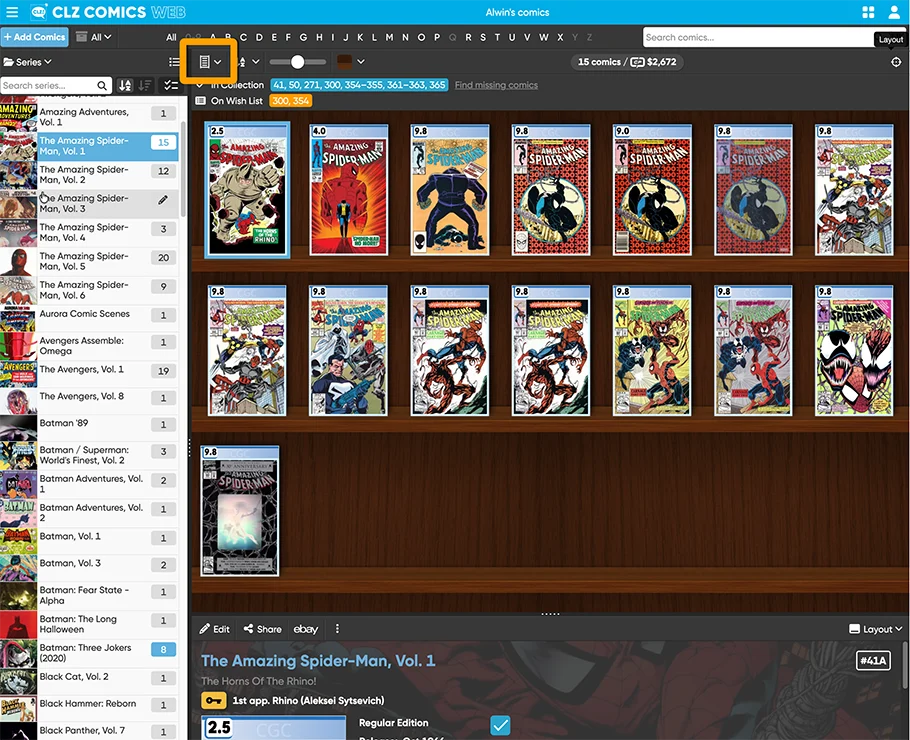
Next to that, a cool cosmetic update for CLZ Comics Web, especially for the slab collectors: the nice slab frames are now visible in ALL views. Again, don’t miss the screenshot link below.
Last but not least, a look “behind the scenes”, in the What’s Cooking section. What are we working on? What can you expect to appear in the next 1 or 2 months? More cool stuff coming up 🙂
The topics today:
- CLZ Web: Create your own Custom Fields!
- CLZ Books v10.6: Track your Reading History, plus other new data fields
- CLZ Comics Web: Slab frames now also visible in Covers, Shelves and Card Views.
- What’s cooking?
- CLZ mobile apps: Faster down syncing FROM CLZ Cloud (e.g. to a new device)
- CLZ Web: add more images to your entries (next to front and back)
- CLZ mobile apps: Create (and Sync!!) your own Custom Fields
CLZ Web: Create your own Custom Fields!
A huge step forward in the customizability of the software. And I am not talking about tweaking the look and feel here, like layout, colors, fonts, etc… No… this time we are giving you the ability to actually customize the database itself!
The Custom Fields feature (previously known as “User Defined Fields”) will let you create your own data fields, to catalog any information for which the software does not have a built-in field. You can create text fields, number fields, date fields, Yes/No toggles, pick list fields and much more.
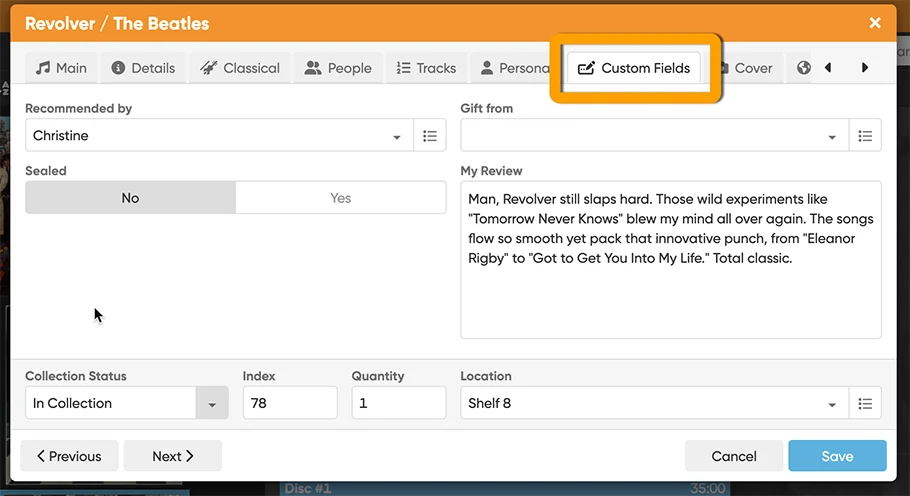
All fields you create can be edited on a special Custom Fields tab of the Edit screen and their data will nicely appear in a special section in the item details panel in the main screen. And of course, you will be able to use the fields like any built-in fields, use them as columns, sort on them, use pick list fields as folders, add the fields to printed lists, exports, etc..
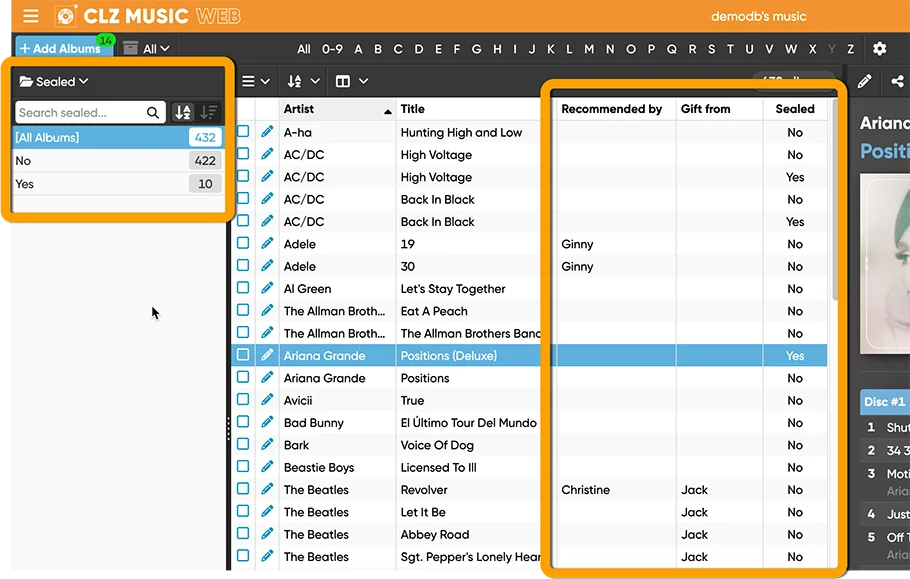
Creating your own Custom Fields
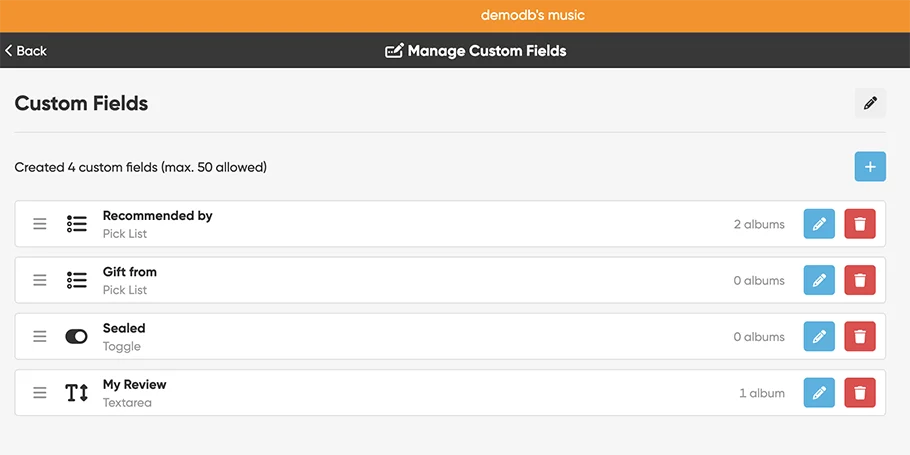
Creating your own fields is done in the Manage Custom Fields screen, open it from the menu, first option under Customization. Click the big blue “Add Custom Field” button to get started.
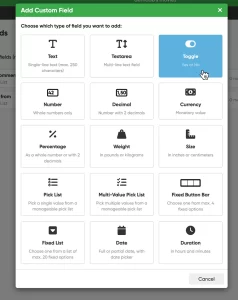
First, you need to choose the type of field you want to add. Choose the one that best fits the type of data you want to track. Lots of options, the feature already offers 15 different field types!
For example: Text (single or multi-line), Yes/No toggle, Number (whole or decimal), Date, Pick list (single or multi-value), Fixed list, Currency, Percentage, etc…
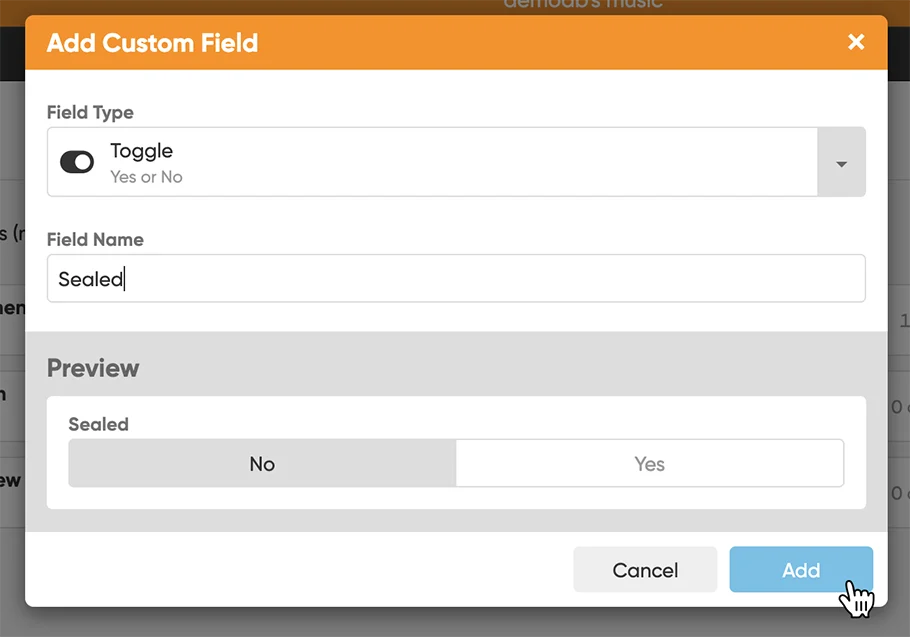
Once you have selected a Field Type, a screen will appear that lets you set the Field Name and possibly several other properties, depending on the type you selected. A preview of your new field will appear at the bottom. When satisfied with your choices, click Add at the bottom right.
Managing your fields
Once you have created some fields, you can drag and drop them to change their order. The order will be used in the Edit screen, and in the display area in the Details panel. You can Edit your created fields too, but only their name and possible control and display type.
Custom Fields Demo Videos and Screenshots
Here are some demo videos that CLZ AJ created that shows how to add some custom fields:
CLZ Movies / CLZ Games / CLZ Comics / CLZ Music / CLZ Books
Or: Go here for lots of Custom Fields screenshots:
CLZ Movies / CLZ Games / CLZ Comics / CLZ Music / CLZ Books
For desktop UDF users:
Are you using User Defined Fields (UDFs) on the “Collector” desktop software? We have a new tool for importing your UDFs from desktop to the new CLZ Web Custom Fields. If you are interested in migrating to CLZ Web, including your UDFs and their data, please contact us here and we’ll help you get your data transferred.
CLZ Books v10.6: Track your Reading History, plus other new data fields
This update went live for the CLZ Books Web software in December last year, so let’s do the same for the CLZ Books mobile app and give you several new features and data fields that have been requested by our customers through the years.
Track your Reading History
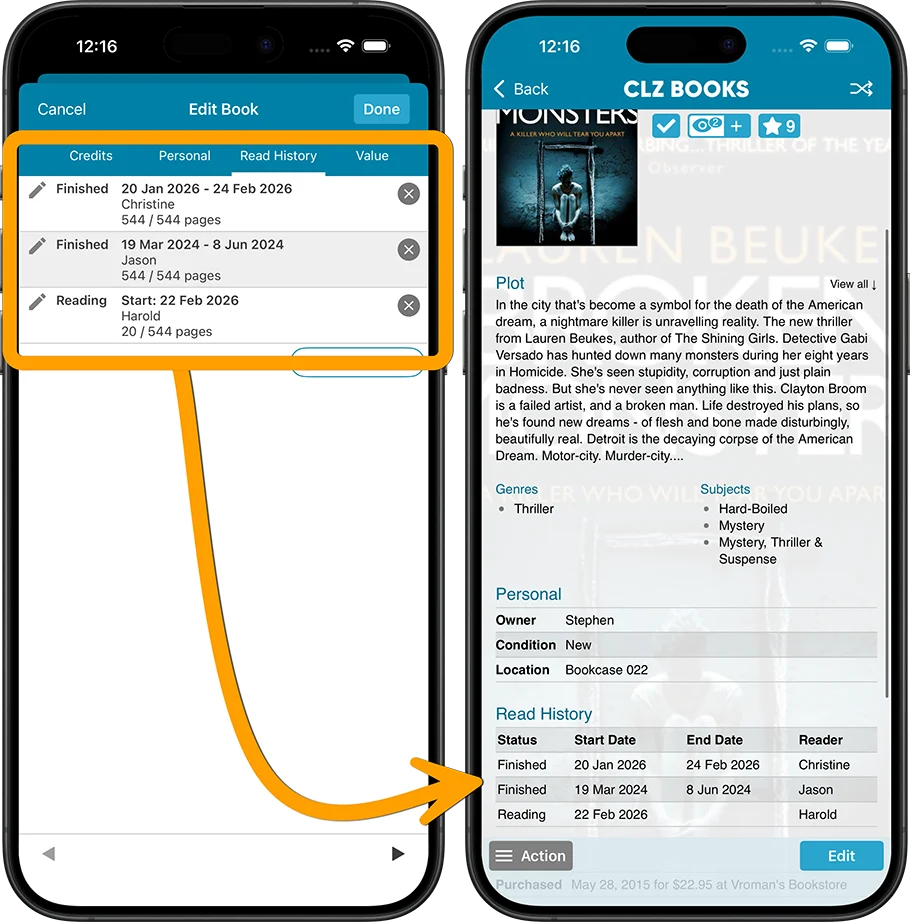
The CLZ Books app has always allowed users to track whether they had read a book (Yes or No), plus a “Read Date”. Simple and effective. However, we kept getting requests for a more advanced way to track one’s reading history. Some users requested to track multiple read sessions, some wanted to enter both Start and End Dates or even allow reading progress, yet other users suggest to allow keeping track of multiple readers.
In the Edit Book screen, you will now find a new tab called “Read History“, that lets you:
- Track multiple read sessions, with their own dates.
- For each session, enter not only the End Date, but also the Start Date.
- Track the Reading Status (Finished, Reading or Dropped).
- Track your Reading Progress, that is, the number of pages read out of the total number of pages.
- And finally, track the Reader, that is who read the book. Great for tracking the reading of your family members too.
Other new fields
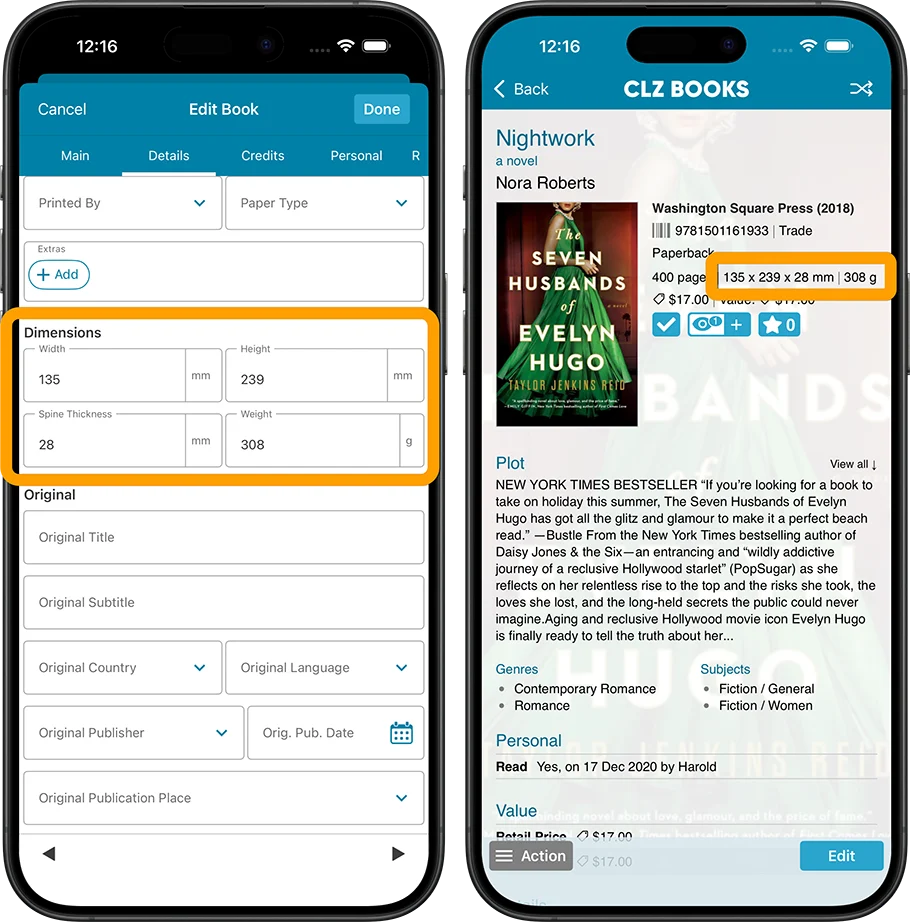
- New dimension fields: Spine Thickness and Weight, delivered automatically from Core!
- Next to Book Condition, a new field for the Dust Cover Condition
- Place of Publication, plus Original Place of Publication
Wanna see some screenshots? Go here!
CLZ Comics Web: Slab frames now visible in Covers, Shelves and Card Views
A special update for the slab collectors!
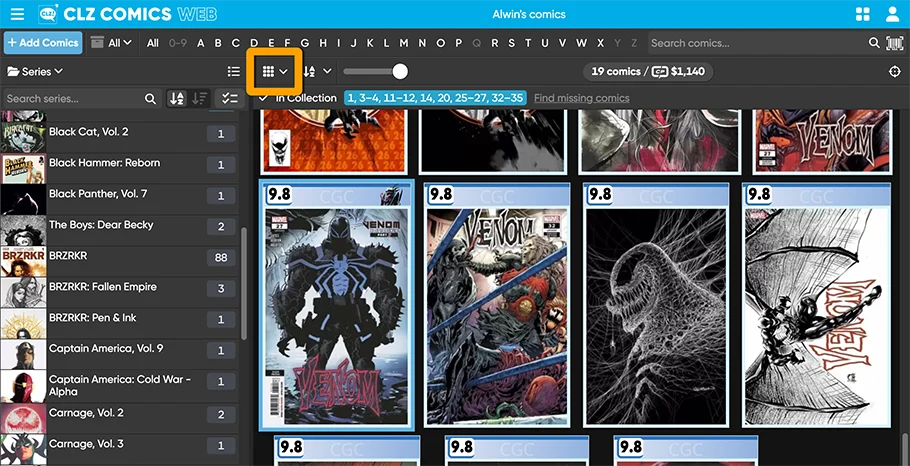
Three years ago, we introduced a new look for slabbed comics, with generated “slab frames” around the cover images, with blue/yellow/green labels at the top and the grade at the top left, even showing actual Custom Labels. Making it super easy to spot your slabs between your raw comics.
For several reasons, that feature was only implemented in the Vertical Card View and on the comic details pages. Not in Horizontal Cards View (we figured it would be too small) or in Cover View and Shelves View (technically complex because of the configurable size).
However, our Web developer Michiel gave it another try and did make it work this time. And the results are so fantastic! Check it out here
( screenshots from my personal slab collection 🙂 ).
What’s cooking?
With the big “CLZ Web Custom Fields” and “CLZ Books new fields” projects out of the way, we are ready to take on some new “endeavours” 🙂
CLZ mobile apps: Faster down syncing FROM CLZ Cloud
No new features here, but an important improvement to an existing one: the CLZ Cloud syncing. Pim and Bernard are implementing three changes that will make the syncing of new items from the CLZ Cloud to your app a LOT faster:
- The Sync with CLZ Cloud will down-sync just the data first, while queuing the image downloads. This will make the data syncing super fast.
- The subsequent downloading of the queued images will be quicker too, especially on fast internet connections.
- Finally, you can already start using the app while the images are still downloading.
CLZ Web: add more images to your entries
After the launch of the Custom Fields, this is the next step customizing your database entries: the ability to add more images, next to the Front and Back covers.
Of course, this will come to the mobile apps too, including full syncing of your custom images!
CLZ mobile apps: Create (and Sync!!) your own Custom Fields
The Custom Fields feature is now live for the CLZ Web web-based software only. But… it is also coming to the CLZ mobile apps! We have just started on that and we hope we can finish that project within 3 months. ETA: end of May, early June?
Once Custom Fields are live for the mobile, you will be able to sync your custom field definitions and their data back and forth between Web and Mobile!
Enjoy!