News & updates
 There we go, the first CLZ Newsletter for 2026. This is CLZ Alwin.
We’re off to a good start, with several smaller updates for the CLZ mobile apps: a cosmetic upgrade for CLZ Comics aimed at slab collectors, an often requested (read: demanded) new setting for CLZ Books and 5 performance improving updates for all 5 Android apps.
Next to that, most of the team is working on 2 big projects that will hopefully reach launch before the next newsletter:
Our mobile deveopers Pim and Bernard are implementing all the recently introduced new book fields to the CLZ Books mobile app, including the reading history. More details below.
Then, there is the BIG ONE, the introduction of Custom Fields (aka User Defined Fields) in the CLZ Web software. Read on below for the first Sneak Preview screenshots!
The topics today:
- CLZ Comics v10.7: Slab frames now also available in images and list views
- CLZ apps for Android: Smoother navigation between folders, list and details
- CLZ Books: New setting to disable book values + search your app by ISBN10
- CLZ Core for Comics: Earlier inclusion of Manga, TPBs/HCs and regular comics
- Coming up for the CLZ Books app: Track your Reading History, plus other new data fields
- Sneak Preview of the Custom Fields for CLZ Web!
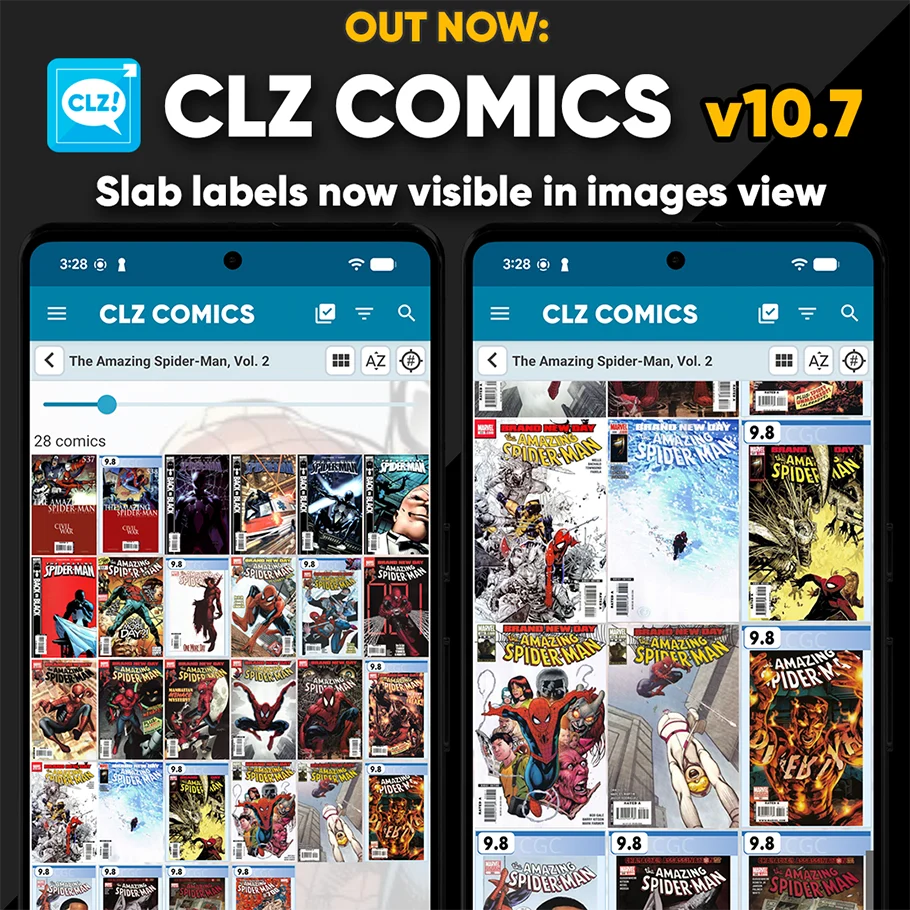
CLZ Comics v10.7: Slab frames now also available in images and list views
A special update for the slab collectors!
Three years ago, we introduced a new look for slabbed comics, with generated “slab frames” around the cover images, with blue/yellow/green labels at the top the grade at the top left, even showing actual Custom Labels. Making it super easy to spots your slabs between your raw comics.
For several reasons, that feature was only implemented in the Card View and on the comic details pages. Not in List View (we figured it would be too small) and in Images View (technically complex because of the configurable size).
However, our mobile developers Pim and Bernard gave it another try and did make it work this time, soo…
The generated slab frames are now visible in List View and Images View too!
CLZ apps for Android: Smoother navigation between folders, list and details
This one is for the Android users!
Our Android developer Pim was working on the app’s main screen and he saw some opportunities for improvement. Mainly to reduce slowness and stuttery behaviour when navigating back and forth between the folder list, the item list and the details page. So instead of starting on the next new feature, we gave him a few days to refactor the code and improve existing functionality.
The result of Pim’s work is live now, in new updates for all 5 Android apps. We have been testing the new updates quite a bit and we think it feels a lot snappier and smoother, especially noticeable on larger collections. We hope you will notice the improvements too and that it will make you enjoy the app even more!
CLZ Books: New setting to disable book values + search your app by ISBN10
A small update for the CLZ Books app, with two changes requested by users:
New: Disable the downloading of book values
In April 2025, in version 10.2, we introduced one of the biggest new features ever: the automatic downloading of book values. The feature has been requested by many users for years, so the introduction of this feature was a huge success: MOST users loved the new values!
However, a small group of users absolutely HATED the new feature. They found the values annoying, not necessary, too “commercial”, etc…
We did not see that coming…. our fault. Maybe with our years of experience as software developers, we could have expected this. Guess we were too excited about the feature ourselves 🙂
Looking back, we should have made the entire feature OPTIONAL from the start.
Of course, making it optional is still possible and that is exactly what we did for this update today. If you don’t want automatic values for your books, you can now disable downloading them via the new “Download Values” toggle in the Settings screen.
When you disable this setting, no book values will be downloaded anymore for any future books you add. On top of that it will also remove all automatic values you already have (any “My Values” you have will remain).
New: Search your database by ISBN13 or ISBN10
For all books in your database, the app normally stores the ISBN in ISBN13 notation, even for older books that original had an ISBN in ISBN10 format. However, this caused problems when searching your database using the ISBN10 notation, it would not find the book.
In today’s update, we fixed that, by including both the ISBN13 AND the ISBN10 notation in the app’s internal search index. Searching your app by ISBN13 or ISBN10 will now find the book, no matter if you have ISBN10 or ISBN13 filled in for it.
CLZ Core for Comics: Earlier inclusion of Manga, TPBs/HCs and regular comics
It’s no surprise that the fall of the biggest comic distributor had a massive impact on the comic book industry as a whole. The ripple effect it created even had an impact on us, as the Diamond Previews were an important source of new release data. We patched the wound of missing comics almost immediately when publishers started to switch to different distributors. Our partnership with CovrPrice was a big help with this too.
However, although not noticeable at first, it created a hole with missing manga, trade paperbacks and hardcovers for upcoming releases.
A few months ago, we asked CLZ web-developer Joe to create new tools to deal with the various new data sources we now have access to. And that has now been done! The journey to that goal definitely came with its own set of problems but he has made it work somehow (Joe truly is a coding wizard). He even worked on perfecting the way our data managers can edit and adjust new releases based on their FOC dates.
Our content managers Rowdy, Justin and Taco are now using the new tools to get new comic data in Core quicker and even before FOC dates strike. This will have the most effect on upcoming TPB’s, HC’s and Manga, but regular comics will also appear in our CLZ Core earlier!
Coming up for the CLZ Books app: Track your Reading History, plus other new data fields
In December 2025, we released a big update for CLZ Books Web, with several new data fields, plus the ability to track your reading history:
- Track your Reading History, with multiple read sessions, each having Start and End Dates, Reading Status, Reading Progress and Reader fields.
- New dimension fields: Spine Thickness and Weight, delivered automatically from Core!
- Next to Book Condition, a new field for the Dust Cover Condition
- Place of Publication, plus Original Place of Publication
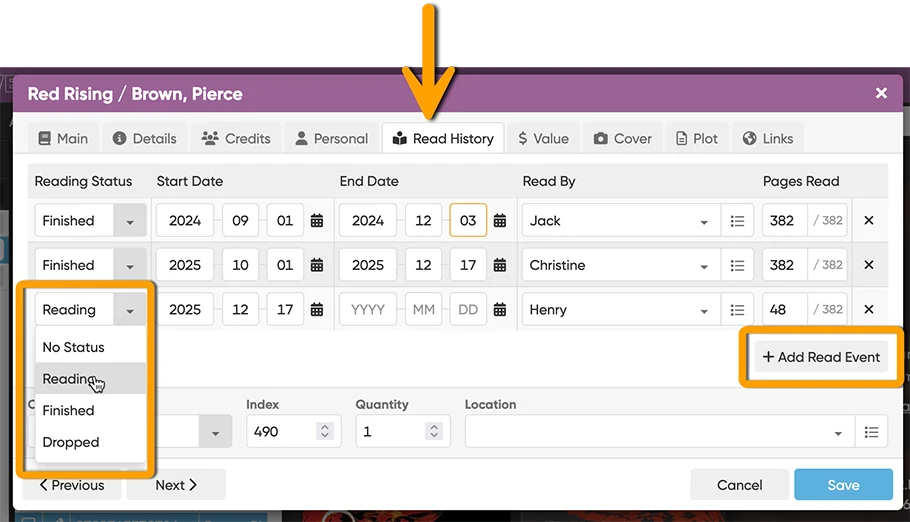
This exact update is coming up for the CLZ Books mobile app too. Our mobile app developers Pim and Bernard are currently adding all the new fields and functionality. They’ll probably need an extra 2 weeks, then there’s testing, fixing etc… release before the end of Feb?
Sneak Preview of the Custom Fields for CLZ Web!
This is going to be THE main feature for 2026: Custom Fields!
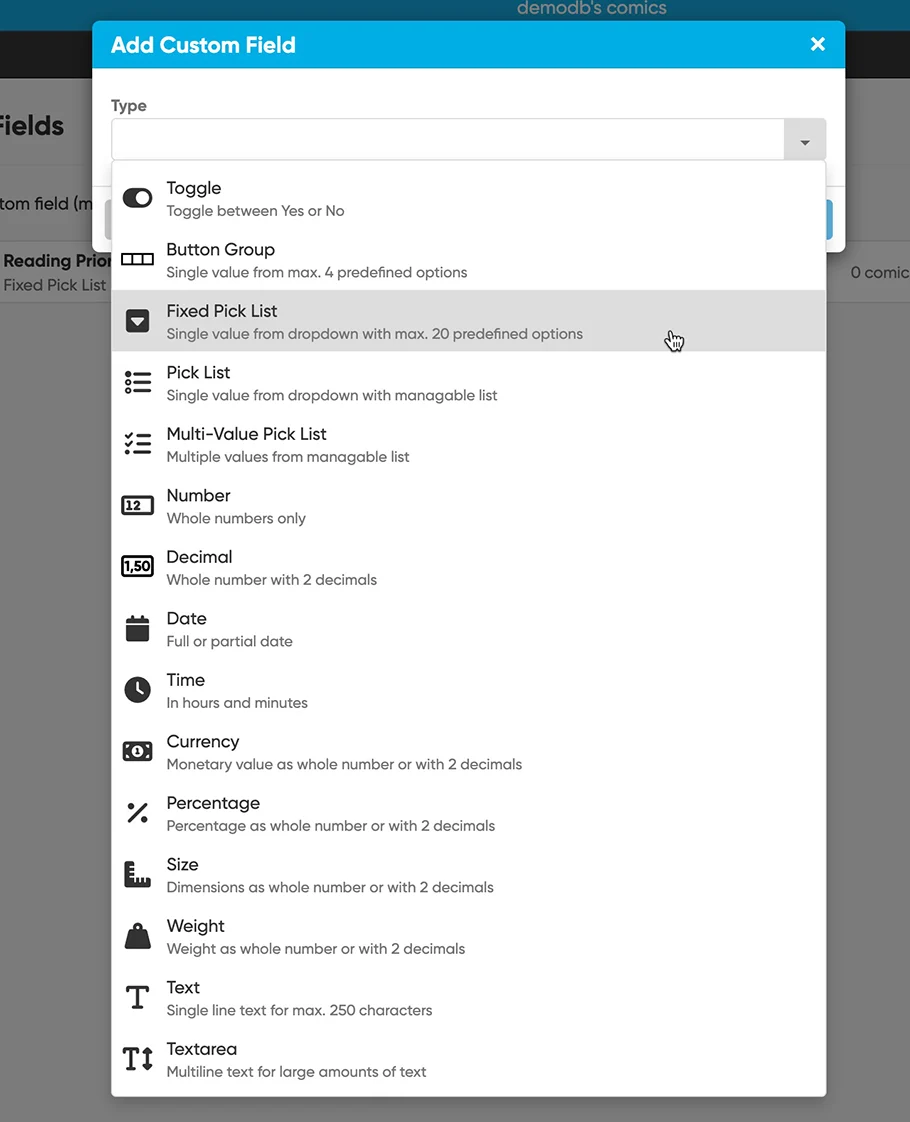
The Custom Fields feature will let you create your own data fields, to catalog any information for which the software does not have a built-in field.
All fields you create will appear on a special Custom Fields tab of the Edit screen. And of course, you will be able to use the fields like any built-in fields, use them as columns, sort on them, use custom pick list fields as folders, add the fields to printed list, exports, etc..
And once the Custom Fields feature has been released for both the Web software and mobile apps, you will be able to sync them back and forth too!
The Web software is quite close to release now, so we can finally show you some Sneak Preview screenshots!
Enjoy!