News & updates
[CLZ News] Track your book reading history with CLZ Books Web / What’s cooking for 2026?
 December 31, so here’s the last CLZ newsletter for 2025.
First, a happy 2026 from the entire CLZ Team: Martin, Rowdy, Sven, AJ, Pim, Joe, Bernard, Justin, Taco, Kelvin, Michiel, Sytske and me, Alwin!
2025 was a great year for CLZ, with a lot of progress on both the mobile and Web editions of our software. And… we’ve got even bigger plans for 2026, if only because of the upcoming “Custom Fields” feature. Read the “What’s cooking” section at the bottom of this newsletter for a quick overview of our Q1 2026 plans.
But first, let’s look back at some nice feature releases of this month, Dec ’25. Nice new fields and features for CLZ Books Web, even better Cover Scanner for comics and an important “Go Web” conversion tool for users of our legacy Movie Collector software.
The topics today:
- CLZ Books Web: Track your Reading History, plus other new data fields
- CLZ Comics 10.6: More improvements for the Cover Scanner
- CLZ Movies Web: Import custom episodes from Movie Collector
- What’s cooking for Q1 2026?
CLZ Books Web: Track your Reading History, plus other new data fields
A huge update for your CLZ Books Web software, bringing several new features and data fields that have been requested by our customers through the years:
- Track your Reading History, with multiple read sessions, each having Start and End Dates, Reading Status, Reading Progress and Reader fields.
- New dimension fields: Spine Thickness and Weight, delivered automatically from Core!
- Next to Book Condition, a new field for the Dust Cover Condition
- Place of Publication, plus Original Place of Publication
Track your Reading History
Our book database software has always allowed users to track whether they had read a book (Yes or No), plus a “Read Date”. Simple and effective. However, we kept getting requests for a more advanced way to track one’s reading history. Some users requested to track multiple read sessions, some wanted to enter both Start and End Dates or even allow reading progress, yet other users suggest to allow keeping track of multiple readers.
We postponed (read: procrastinated) implementing all this for quite a while, mainly because we wanted to go all the way with this. And for this update… we did exactly that!
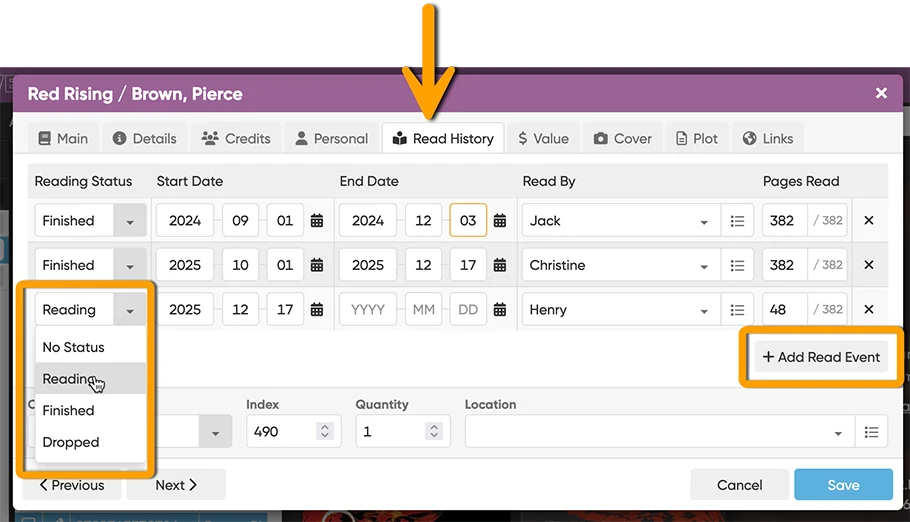
In the Edit Book screen, you will find a new tab called “Read History“, that lets you:
- Track multiple read sessions, with their own dates.
- For each session, enter not only the End Date, but also the Start Date.
- Track the Reading Status (Finished, Reading or Dropped).
- Track your Reading Progress, that is, the number of pages read out of the total number of pages.
- And finally, track the Reader, that is who read the book. Great for tracking the reading of your family members too.
Tip: use the folder feature to group by Reader, Reading Status, Reading Year, Reading Month, or Reading Date to get a nice overview of which books you or someone else in your family is reading, has read or dropped, for each period.
Also, use the new Sort Option “Last Read” to sort your books by the last date you read them.
More book dimension fields: Spine Thickness and Weight
Next to Width and Height, we now added two new book dimension fields:
- Spine Thickness (also referrer to as Spine Width)
- Weight
Both can be manually filled in on the Details tab of the Edit Book screen. AND: the fields are now also automatically delivered from Core for most new books you add!
Dust Cover Condition
Next to the regular Book Condition, there is now a separate field for the condition of the Dust Cover (also referred to as “Dust Jacket”).
Place of Publication and Original Place of Publication
These helps you keep track of where a specific edition was published, and where the book originally came from. Very useful for translated works, reprints or international editions.
Coming up for the CLZ Books Mobile app soon!
These new features are now live for the CLZ Books Web software, for your computer.
Of course, this is all coming to the CLZ Books mobile app too, in version 10.5. Mobile developers CLZ Pim and CLZ Bernard just started on the update and we hope to release it near the end of January 2026, maybe early February.
Check out lots of screenshots of the new features here.
CLZ Comics 10.6: More improvements for the Cover Scanner
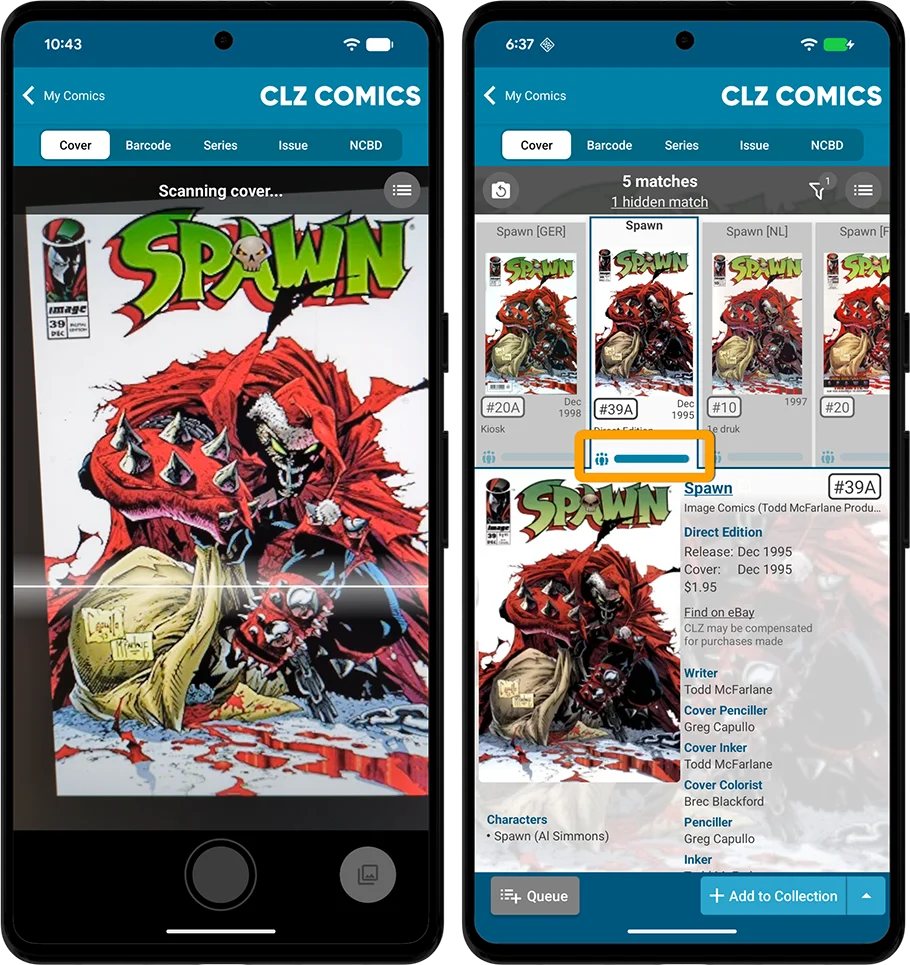
Another update to the Cover Scanner, to better help you select the correct match:
- Improved recognition of Newsstand vs Direct editions
- A new Variant Filter to always hide specific variants
- Popularity indicators for each match
Improved recognition of Newsstand vs Direct editions
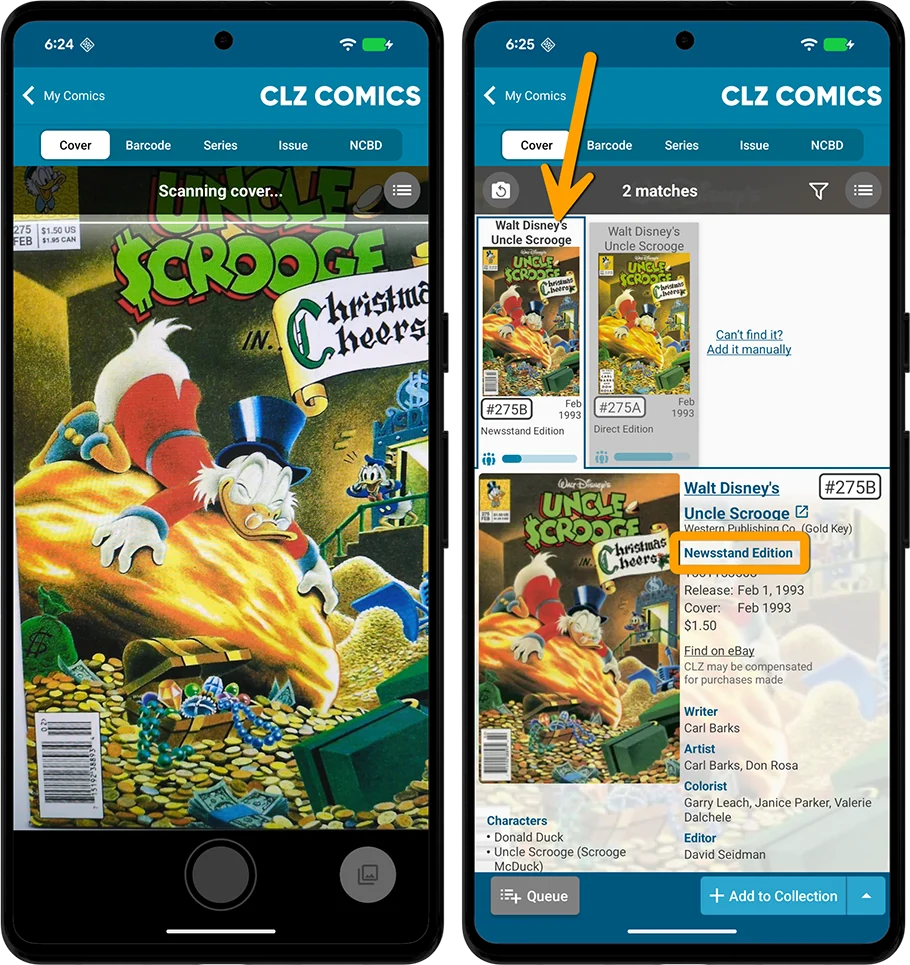
The Cover Scanner now does a better job recognizing Newsstand editions from Direct Editions. In other words, if you scan a Newsstand edition, it is more likely that the Newsstand edition will indeed be shown as the first and default match.
A new Variant Filter to always hide specific variants
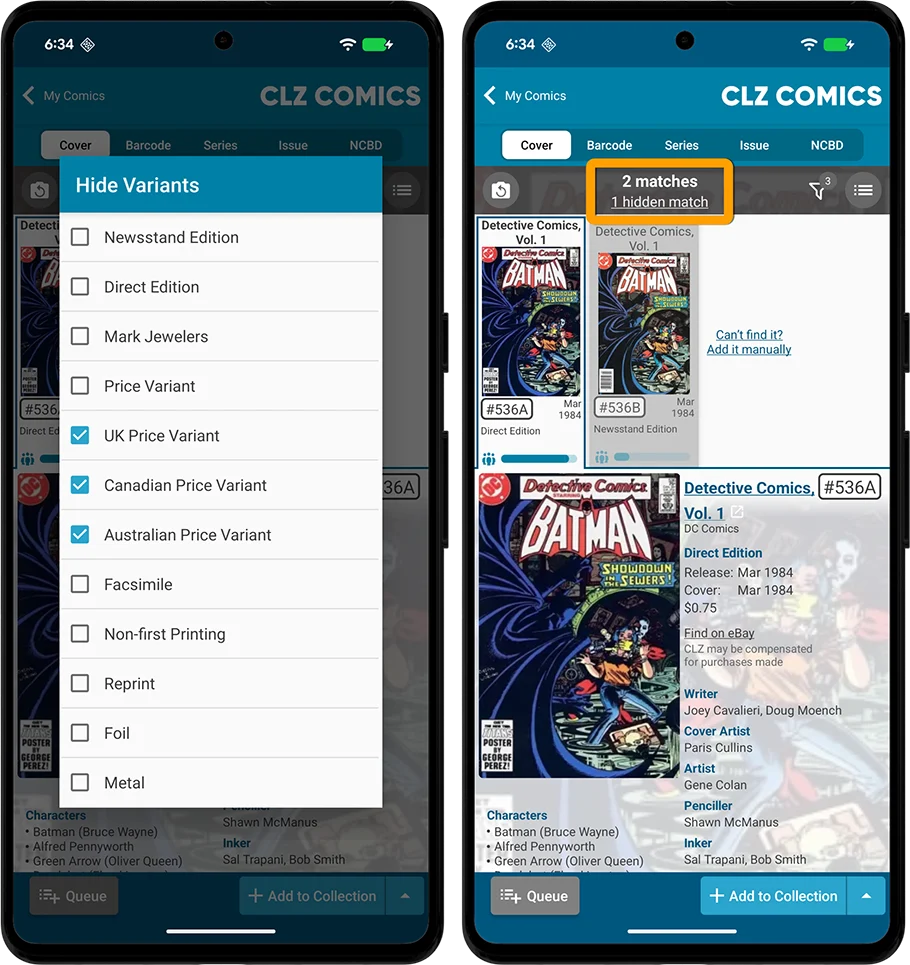
We also added a new Variant Filter, that lets selected which type of variants you want to hide. Choose from:
Newsstand Edition, Direct Edition, Mark Jewelers, Price Variant, UK Price Variant, Canadian Price Variant, Australian Price Variant, Facsimile, Non-first Printing, Reprint, Foil, Metal.
When you scan a cover while a Variant Filter is active, the bar at the top will tell you if there are any hidden matches. Tap that number to instantly show those matches anyway.
Popularity Bars for each match
The above two changes will probably help you select the correct match in most cases, but we wanted to give you one more useful bit of info to help you pick your match more easily.
All cover scan matches now include a “Popularity Bar”, which shows the relative popularity of each match, based on the number of occurrences in our CLZ Cloud. In most cases, that help you to instantly spot the “regular” variant, the most popular and probably most likely match.
For example, if you scan the regular edition of a comic and there are multiple variants with very similar covers, the Cover Scanner may in some cases still select an Italian version, or a reprint or facsimile, as the first match. When that happens, the Popularity Bars will help you to instantly spot the regular cover (because it will have the biggest bar).
You can find some screenshots of the new tools here.
CLZ Movies Web: Import custom episodes from Movie Collector
In our big September update for CLZ Movies Web, we introduced the ability to edit episode lists for TV series, or, to completely add them manually. A feature that was already available in the legacy Movie Collector desktop software, but since September, it is finally available for the Web edition too.
Now, to help users to finally make the switch from Movie Collector to CLZ Movies Web, our web-developer Joe has created a smart import tool that can import a Movie Collector XML file, extract all custom episode lists and add them to the TV Series entries in CLZ Movies Web.
This is a one-time import, only meant for users who are making the switch from Movie Collector to CLZ Movies Web. To do this, you need to follow some steps which can be found in CLZ Movies Web:
- Click the menu top left and select ‘Import/Export’
- Click “Import custom episodes from Movie Collector’
Important: if you currently ALSO have User Defined Fields in Movie Collector Windows, and you would like to import those before switching to CLZ Movies Web, please do not use this tool until the Custom Fields feature is available, ETA early 2026.
What’s cooking for Q1 2026?
Here’s what we are planning for early 2026:
- Create your own Custom Fields
THE main 2026 feature! Catalog information for which the software does not have a built-in field. Use simple text fields, number fields, currency fields, yes/no toggles, big text areas (like Notes), even pick list fields and multi-value pick list fields. Coming up for CLZ Web first, then later for the CLZ mobile app. - CLZ Comics: Generated slab labels in List and Images View
Easily recognize your slabs in all views. - CLZ mobile apps for Android: Smoother and faster navigation
Overall snappier performance while navigating between folders, list and details (already live for the game and movie editions) - CLZ Books: Track your Reading History, plus other new data fields
All new features and fields we just introduced for the Web edition. - CLZ Comics: new integrated FOC / NCBD tool
We’ll bring the NCBD tab to the main menu and will add FOC lists too.
Talk to you again next year!
Enjoy!