News & updates tagged 'ios' (page 2)

New:
- More optimizations for down-syncing with CLZ Cloud

New:
- More optimizations for down-syncing with CLZ Cloud

New:
- More optimizations for down-syncing with CLZ Cloud

New:
- More optimizations for down-syncing with CLZ Cloud

Fixed:
- Converting/Optimizing Database process was slow/crashing for some users. We have now fixed this and made the database conversion much faster
- Sync with CLZ Cloud: The progress bar for images didn’t count the images that had to be downloaded correctly
Fixed:
- Sync: Custom covers weren’t downloaded
Fixed:
- Renamed “Store” to “Purchase Store”
- Clearer link to investigate a value on CovrPrice
- Check Value: Key reason wasn’t always fully displayed
- Edit Comic: Links tab: Tapping next/previous comic when waiting for link description could crash the app
- iPad: Edit screen: Tab titles weren’t always shown in full
Fixed:
- Sorting on “Last Read” (still) didn’t work correctly (and wasn’t displayed correctly)
Fixed:
- Pre-fill: Watched now has a “Watched/Not Watched” toggle
- Edit: Personal: New big blue “Mark as Watched” button on the Personal tab for unwatched movies
- Edit: Links: Tapping next/previous movie while waiting for link description could crash the app
- Trailers weren’t downloaded for the separate entries when adding a box set
Fixed:
- Edit Game: Links tab: Tapping next/previous game when waiting for link description could crash the app
- iPad: Edit Game: Tab titles weren’t always shown in full
Fixed:
- Renamed “Listened” to “Played”
- Edit: Personal: New big blue “Mark as Played” button on the Personal tab for unplayed albums
- Edit: Links: Tapping next/previous album while waiting for link description could crash the app
Fixed:
- Details panel: Data in the “Read” field wasn’t always displayed correctly
- Sorting on “Last Read” didn’t work correctly (and wasn’t displayed correctly)
Fixed:
- iPad: Edit Book: add/edit Read Event: the “Reading Status” dropdown wasn’t working
- iPad: Edit Book: the tabs didn’t display correctly
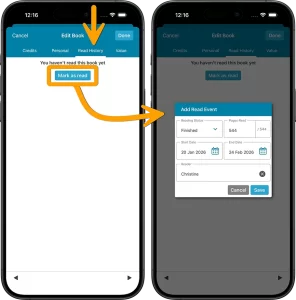 Today, another huge update for your CLZ Books mobile app, version 10.6. The update brings several new features and data fields that have been requested by our customers through the years:
- Track your Reading History, with multiple read sessions, each having Start and End Dates, Reading Status, Reading Progress and Reader fields.
- New dimension fields: Spine Thickness and Weight, delivered automatically from Core!
- Next to Book Condition, a new field for the Dust Cover Condition
- Place of Publication, plus Original Place of Publication
Fixed:
- Crash: When a book couldn’t be located/selected on start-up or after editing the app could crash
- iPad: books sometimes wouldn’t be scrolled to after picking it from a search in your own collection
- Collection bar at the bottom could disappear on closing the sync screen
- Collection bar didn’t appear immediately when adding a new collection for the first time
Fixed:
- Crash: When a movie couldn’t be located/selected on start-up or after editing the app could crash
- iPad: movies sometimes wouldn’t be scrolled to after picking it from a search in your own collection
- Collection bar at the bottom could disappear on closing the sync screen
- Collection bar didn’t appear immediately when adding a new collection for the first time
Fixed:
- Crash: When a game couldn’t be located/selected on start-up or after editing the app could crash
- iPad: games sometimes wouldn’t be scrolled to after picking it from a search in your own collection
- Collection bar at the bottom could disappear on closing the sync screen
- Collection bar didn’t appear immediately when adding a new collection for the first time
Fixed:
- Crash: When series or comic couldn’t be located/selected on start-up or after editing the app could crash
- iPad: series sometimes wouldn’t be scrolled to after picking it from a search in your own collection
- Collection bar at the bottom could disappear on closing the sync screen
- Collection bar didn’t appear immediately when adding a new collection for the first time
Fixed:
- Crash: When an album couldn’t be located/selected on start-up or after editing the app could crash
- iPad: albums sometimes wouldn’t be scrolled to after picking it from a search in your own collection
- Collection bar at the bottom could disappear on closing the sync screen
- Collection bar didn’t appear immediately when adding a new collection for the first time
Fixed for iOS:
- The scroll position in the list could be wrong after searching in own collection and tapping a result from the suggestions
- Images view: Pinch to zoom in images view was broken
- Edit screen: tapping “next” or “previous” on the Links tab would crash the app
Fixed for iOS:
- The scroll position in the list could be wrong after searching in own collection and tapping a result from the suggestions
- Images view: Pinch to zoom in images view was broken
- Edit screen: tapping “next” or “previous” on the Links tab would crash the app
Fixed for iOS:
- The scroll position in the list could be wrong after searching in own collection and tapping a result from the suggestions
- Images view: Pinch to zoom in images view was broken
- Edit screen: tapping “next” or “previous” on the Links tab would crash the app
Fixed for iOS:
- The scroll position in the list could be wrong after searching in own collection and tapping a result from the suggestions
- Images view: Pinch to zoom in images view was broken
- Edit screen: tapping “next” or “previous” on the Links tab would crash the app
- When opening Add Comics via Missing Comics and checkboxing issues to add, the list could show duplicates
Fixed for iOS:
- The scroll position in the list could be wrong after searching in own collection and tapping a result from the suggestions
- Images view: Pinch to zoom in images view was broken
- Edit screen: tapping “next” or “previous” on the Links tab would crash the app
Browse
Archive
Tags
add comics
add from core
adding
android
barcode
barcode scanner
barcode scanning
box sets
card view
CLZ Barry
clz cloud
collection status
comic collector
comic values
connect
core
covrprice
custom images
details panel
edit
editing
edit multiple
field defaults
fix
folders
images
images view
ios
key
manage pick lists
movie collector
multiple collections
ncbd
newsletter
performance
pre-fill
quick search
search
search-as-you-type
security
skins
sorting
statistics
sync
sync images
syncing
templates
update from core
values
windows