What's new in CLZ Comics? (page 28)

- When using folders, a new [None] entry contains the items that have no value (yet) for the selected folder field.
- Tablets: New always available search box in top bar.
- Add screen: some performance improvements.
- Main list: fixed slow scrolling problem.
We fixed an issue where the menus could show up “empty” on some Android devices out there. Should be good again now! 🙂
A huge v4.3 update for your CLZ Comics app is now available.
And prepare to be shocked 🙂 (in a good way, don’t worry):
The app looks completely different now, with a cleaner brighter look and an improved user interface.
New:
- New “Material”-based interface, with two skins/themes: Light & Dark.
(The app now starts in the Light skin. If you prefer the Dark look, just use the View menu top right) - Big floating blue “+” button for adding movies.
- Access all other features and tools from “hamburger” menu top left.
- Clear and easy switch between All / In Collection / Wish List at the top.
- Access all other view options from menu on top right.
- Add screen: tabs at the top to switch between By Title and By Barcode modes.
- Add Manually is now a separate menu item in the menu on the left.
- Redesigned book list entries.
- Old Import from Comic Collector has been moved to Settings screen!

“Export to Text”, a feature previously only available to Connect subscribers, has now also been added to the CLZ Cloud viewer.
We figured that exporting to a text file, e.g. a CSV for Excel, should be available to any user, whether they own Connect, the desktop software or a CLZ mobile app.
You can find the Export to Text feature by visiting your own collection in the CLZ Cloud viewer, clicking the little “wrench” icon top right, then selecting Export.
Enjoy!
Fixed:
- CLZ Cloud Sync: Notes were not down-synced.
- Edit Screen: Year picker: it was not possible to pick a year before “1888″.
- Manage Pick Lists screen: labels width was too short.
We have completely rewritten our Core for Comics search engine, that is, the online code that gives you results when you search our Core by Title in your Add screen.
The new search engines will provide better search results that are more “to-the-point” and less “fuzzy”. Also, results will be returned much faster.
- Fixed already in collection highlighting in the add by barcode screen
- Fixed selection of issues in barcode search results
- Fixed losing changes when suspending the app while editing
Version 4.2 adds a couple of improvements and tools that are essential for users who are doing most of their editing on the mobile apps:
- New “Manage Pick Lists” screen (under new Tools menu).
This new screen lets you take control of your pick lists, that is book Authors, music Artists, comic Series, Publishers, Formats, Genres, Subjects, etc… Use it to:- Fix typos in names.
- Remove unused entries.
- Merge duplicate entries.
- Edit the SortNames for comic Series.
- Edit screen improvements:
- New “value picker” screen for pick list fields, like Authors, Artists, Series, Genres, Subjects, etc… Just tap the field, pick a value from the pick list that appears and done. No more need to type the first few letters of a value (we all hate typing on mobile devices, don’t we?)
- Tap the pencil icons to directly edit names of pick list entries.
- Tap the pencil icon for Artists, Authors and Series to directly edit Names *and* SortNames.
- New “Manage Pick Lists” tool for editing and merging Series, Publishers, Series Groups, etc..
- Edit screen: edit the Sort Names for Series for complete control over correct series sorting.
- Edit screen: Now edit the names of Series, Publishers, etc.. .
- Edit screen: New “value picker” screen for quickly filling fields like Series and Publisher.
- New Tools menu, with Manage Pick Lists, Field Defaults and Empty Database tools.
- Fixed crashes in in-app purchase screen on certain Xiaomi phones
- Fixed crash in in-app purchase screen when only one in app purchase was offered
- Fixed barcode search not working with hardware keyboards
- Fixed wrongly pre-selected search result in barcode search
- Fixed rare crash in the main screen
- Fixed crash while syncing broken images
New:
- Settings / Field Defaults: choose field values that will be set for each new entry automatically.
- Edit screen improvements:
- Improved layout to make it easier on the eye
- New “Select Value” screen for easier entry of pick list fields (e.g. Artist, Format, Genre, etc…)
- Cancel and Done buttons have been moved to the top bar.
- New Delete button at the bottom.
New:
- New folder option: Collection Status: group comics by their Collection Status (Collection, Wish List, On Order, For Sale)
Fixed:
- Fixed login error that could occur
- Search not working correctly after updating a comic from Core
Previously, the Connect free 30-day trial limited trial users to 100 items in their database.
To allow full evaluation of our Connect software during the trial, we have removed this database limit. The free 30-day trial now lets you add, import or sync as many items as you want.
Enjoy!
CLZ Comics is now free to download, with a database limit of 100 comics. Unlock higher database limits using In App Purchases.
If you purchased CLZ Comics before the 4.0 release, then the 4.0 version will be automatically unlocked to an *unlimited* database size. You do NOT need to pay again 🙂
If, for whatever reason, this didn’t work for you, then just CONTACT US and and we’ll unlock it manually, free of charge!
New:
- Easily switch between Add methods (Title/Barcode/Manual).
- Re-designed search results with included cover images.
- Add by Barcode now automatically opens Camera Scan screen.
It’s been a long time in the making, but it’s finally here:
CLZ Comics 4.0 for iOS!
Apart from several improvements to the Add Comic screen (see below), the 4.0 version contains an important change:
CLZ Comics for iOS is now free to download
Starting with version 4.0, CLZ Comics is free to download and starts with a limit of 100 comics.
New:Improved Add Comics screen
- Easily switch between Add methods (Title / Barcode / Manual).
- Re-designed search results with included cover images.
- Now add directly from results using quick-add buttons
(no more need to open the Preview Screen). - New black style for Preview Screen.
- Add by Barcode now automatically opens Camera Scan screen.
- Larger Camera Scan screen on iPad.
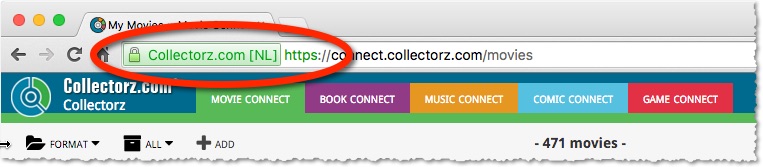
For better security, we have now moved both the Cloud and Connect websites to the HTTPS protocol, using so-called Extended Validation SSL certificates.
This SSL connection is indicated by the nice “green bar” in your address bar:
In the past 2 weeks, we have moved all 5 online media databases (movies, books, music, comics and games) to 5 new separate database servers.
This week, CLZ web developers Sven and Dion have further optimized these new servers to give you even better performance from Core, especially for title searches that have many results.
The fruits of their labour are now immediately noticeable in the ADD screens of your Connect software. Enjoy!
Today, we have completed the big project of moving our 5 Core and Cloud databases to a new server solution. Previously, everything was running on two high performance dedicated machines: one for all databases and websites, the second for all cover images.
For better performance, stability and scalability, we are now splitting up all services into multiple separate cloud-based solutions:
- 5 separate database servers for all 5 Core+Cloud databases
Status: completed today! - 5 separate storage servers / delivery networks for all cover images.
Status: preparing the switch now. ETA: several weeks. - 1 new fast web server for the Cloud, Core and Connect sites and services.
ETA: within 2 months.
Multiple new field options have been added for the folder panel (for both Connect and the free CLZ Cloud viewers). My favorite new folder option: The Year folder for movies:
The home / hub page of your CLZ Cloud or Connect account now loads a lot faster.
(the 5 separate collection lists are now “lazy-loaded”)

A few weeks ago, we introduced the new Sort Order screen. Today we’re taking the next step: allowing multi-field sorting.
For example, you can now sort your list first by Year, then within the years, by Title.
Just drag multiple fields from the Available panel to the Selected panel, one by one:

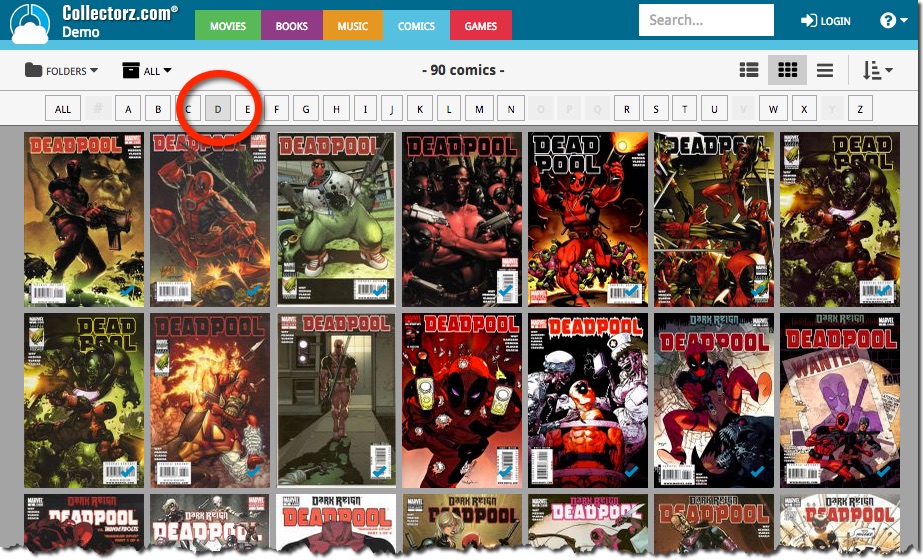
It took a little longer than planned, but the popular Alphabet Bar is now live for Comic Connect and the CLZ Cloud for Comics:
New in all five Connect editions: Export your list to a text file, e.g. to CSV format, for importing into spreadsheet programs like Excel, Numbers, etc…
You can either:
- Export your entire database, by choosing Export from the Tools menu.
- Export only a selection. To do this, go to Select Mode, select some items, then click the Export button at the top.

