What's new in CLZ Games Mobile? (page 3)

icon
CLZ Games Mobile

v9.1.3: New big blue buy button

Jun 05, 2024

New:

  • We changed the “buy now” text link into a big blue button so it’s more clear!

icon
CLZ Music Mobile

v9.1.2: New big blue buy button

Jun 05, 2024

New:

  • We changed the “buy now” text link into a big blue button so it’s more clear!

Fixed:

  • In some cases logging in to an existing account after starting Free Mode would cause problems with adding.
icon
CLZ Games Mobile

v9.1.2: Fix for Free Mode

Jun 03, 2024

Fixed:

  • In some cases logging in to an existing account after starting Free Mode would cause problems with adding.


A small update for your CLZ Games app today, in which we rectify a big mistake we make in version 9.0 (two mistakes in fact). Also, we improved the camera barcode scanner and introduced a new setting for customizing your app.

Summary of today’s changes:

  • Game values are back in the Add Games screen
  • Check Values screen now accessible for “grandfathered” users too
  • Faster camera barcode scanner for adding games by barcode
  • New setting in Settings screen “Show Completed”

Read more


icon
CLZ Games Mobile

v9.0.4: Fixed a couple of crashes

Apr 02, 2024

This build fixes a couple of crashes that have been reported through our systems.


New:

  • Check Value screen will now highlight titles/barcodes to show if you already have them in your collection (blue = in collection)
  • Added 3 new platform icons: MSX, MSX 2 and Atomiswave

Fixed for iOS:

  • Search as you Type was not working in the “Check Value” screen (by Title)
  • A crash could occur on devices running iOS12
  • Update from Core now leaves the value alone (use Update Values to get new values)

Fixed for Android:

  • Sync with CLZ Cloud: A crash could occur during downsyncing
  • Updating Game Values: A crash would occur on loading the “Updated Values” report
  • Unrecognized Barcode: An error would show if no images were found for the barcode


It’s Friday, so this is my fifth and final “CLZ Games 9 Feature Hilite” email.

All five v9 Feature Hilites are now available on our CLZ Blog here, including lots of screenshots:

Read more


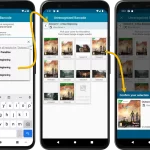
This is “CLZ Games 9 Feature Hilite” number FOUR, all about dealing with barcodes that are not found in CLZ Core.

But first, if you missed an earlier feature hilite, you can still read them on our CLZ Blog here:

Read more


It’s me again, CLZ Alwin, with this week’s third “clz games feature hilite” email. If you missed the first two, you can still read them here:

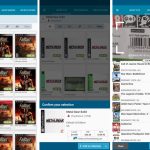
Today’s feature hilite is about the brand-new “Check Value screen!
Read more


Here’s my second “v9 feature hilite” email, about the next big feature of last week’s CLZ Games v9 release.
(tip: if you missed yesterday’s feature hilite #1, you can read it here).

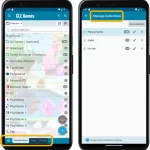
Today, we are going to discuss the new collections tab-bar.
Read more


Last week’s CLZ Games 9.0 update was HUGE one, with 5 big new improvements. To make sure you did not miss any of the new stuff, I am going to do five “v9 feature hilite” emails this week, each one highlighting one of the big improvements.

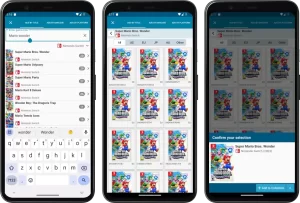
Today’s “v9 feature hilite” is about all the improvement to the Add Games screen, in particular the Add by Title part.

Read more


Version 9 is here, a huge update for your CLZ Games app. In fact, it may even be the biggest update we ever did for CLZ Games, with many new features and several big improvements.
On top of that, our content team has been working for months to check and correct game cover images, to make sure the cover image exactly matches the barcode (regular editions vs collector’s editions, US vs EU vs JP vs AU covers, etc…).

  • Improved Adding Games by Title: big cover images for the various game editions (regional, collector’s editions, etc..), filter releases by Region (US, EU, JP, AU, etc.. )
  • New collections tab-bar: switch between collections using tabs at the bottom
  • New Check Value screen: quickly look up the value of a game, by scanning its barcode or searching by title (requires subscription!)
  • Improved Update from Core: now lets you replace cover images with better ones from Core
  • Better screens for dealing with “unrecognized barcodes”
  • More platforms icons: more platforms now come with their own icons

Read more


icon
CLZ Games Mobile

Sneak Preview: CLZ Games 9.0

Feb 29, 2024

An enormous update for the CLZ Games app is coming up within a few weeks, with the following new features and improvements:

  • Improved Adding Games by Title: big cover images for the various game editions (regional, collector’s editions, etc..), filter releases by Region (US, EU, JP, AU, etc.. )
  • New collections tab-bar: switch between collections using tabs at the bottom
  • New Check Value screen: quickly look up the value of a game, by scanning its barcode or searching by title (requires subscription!)
  • Better screens for reporting “unrecognized barcodes”
  • More platforms icons: more platforms now come with their own icons

Read more


icon
CLZ Music Mobile

v8.4.5: New “Delete CLZ Account” option

Dec 06, 2023

What’s New:

  • New “Delete CLZ Account” option in Settings


What’s new:

  • Added a new “Remove all unused pick list entries” option in the maintenance menu, to remove all unused pick list entries in one go

icon
CLZ Games Mobile

v8.4.3: Couple of fixes and changes

Nov 07, 2023

Changed:

  • For new users: no more Demo Mode

Fixed on iOS:

  • Edit screen: Picking something from a pick list: The search could mess up your choice
  • The sync button could show on details view

icon
CLZ Games Mobile

v8.4.2: Various bug fixes

Nov 01, 2023

A build full of fixes for bugs reported by you. Thanks to everyone who reported these bugs!

Fixed:

  • Unreliable search results after editing or merging pick list items
  • Edit Multiple: Some fields were turning orange once typed in
  • Merge mode in pick lists would not remember selection when using the search in the list
  • Typing a comma in price/value fields wasn’t always working
  • Editing a pick list item could give a wrong “Already in List” error
  • Multi-level folders: when filtering inside a folder the search text would clear after typing a space
  • Multi-level folders: When you searched an item and picked one from the suggestions dropdown, it would bring you inside the folder, instead of directly to the item.
  • Editing an item could send you to a different folder than you were in
  • Pre-fill screen: Completeness toggle didn’t set manual/box checkboxes correctly

icon
CLZ Games Mobile

v8.4.2: Various bug fixes

Nov 01, 2023

A build full of fixes for bugs reported by you. Thanks to everyone who reported these bugs!

Fixed:

  • Unreliable search results after editing or merging pick list items
  • Now remembers scroll position better when hitting “back” from an item
  • Adding a new pick list item with an apostrophe, would wrongly trigger an “Already exists” warning
  • Edit screen: Picking a pick list item after tapping next/previous could crash the app
  • Edit screen: For some fields the selected pick list item would be added twice
  • Add by Platform: checkboxes are now unchecked after adding the games
  • Values weren’t always showing in the Add Games screen

icon
CLZ Games Mobile

v8.4: Easier access to Manage Pick Lists tool

Oct 25, 2023

A lot of the questions we get about CLZ Games can usually be answered with:

“Just use Manage Pick Lists”

Renaming Locations, Merging duplicate genres, fixing platform sort problems, fixing typos in formats, etc… it is all done in the Manage Pick Lists screen. An important and powerful screen, but… not so easy to find if you don’t know where to look or don’t even know what to look for.

With this update, we are trying to fix all that. We have made the screen much more accessible / discoverable AND we have made several improvements to the MPL screen itself.

Read more


This update is all about the Pre-fill screen, you know, the screen that appears when adding items and lets you pre-fill fields while adding, like Completeness, Location, Owner, Purchase Date/Store/Price, etc…

This Pre-fill screen was introduced in Jan 2021, with a fixed set of fields. Then a year later, in Jan 2022, it was made completely user configurable, so that *you* could choose which fields appeared on the screen.

This screen turned out to be a popular tool, but we’ve seen one problem with it:
Sometimes, users pre-fill a field for a specific game (e.g. Purchase Price or Quantity), then forget to CLEAR it for the next games they add. Causing lots of games to be added with that same field set incorrectly.

So today, we are making another tweak to the Pre-fill screen:

  • The Pre-fill screen now highlights filled fields in orange, so that they stand out more.
  • Also, we added a “Clear” button, to quickly clear all Pre-fill fields.

Fixed

  • iOS: iPad: Year folders: the wrong year folder could be selected.
  • Android: Values weren’t downloaded for games sometimes.

icon
CLZ Games Mobile

v8.2.1: New in-app getting started tips

Sep 14, 2023

New:

  • Added in-app getting started tips for new users (tap “dismiss” to dismiss)

icon
CLZ Games Mobile

v8.2.1: New in-app getting started tips

Sep 13, 2023

New:

  • Added in-app getting started tips for new users (tap “dismiss” to dismiss)

icon
CLZ Games Mobile

v8.1.2: Bug fix for users who were not logged in

Sep 12, 2023

Fixed:

  • Fixed: adding items did not work for users that were not logged in

icon
CLZ Games Mobile

v8.1: New Sync button on main screen

Sep 06, 2023

In this update, we try to tackle a problem that we often see in our support system:

Users changing phones without updating their CLZ Cloud first. Or even worse, without even having a CLZ Account yet.
Which of course cause data loss (and a lot of sadness).

So in this version, we are trying to create more awareness of:

  1. The importance of creating a CLZ Account, so that you can Sync with CLZ Cloud.
  2. The importance of keeping your CLZ Cloud up-to-date by actually Syncing with CLZ Cloud.

New Sync button in main screen

When not in sync with CLZ Cloud, a new Sync button will appear on the main screen, above the Add button. This way you will always know if there are still items to sync up to CLZ Cloud or down from CLZ Cloud (even when you use auto-sync).

(Don’t like this button? In the Settings screen, switch OFF the setting that says “Show on-screen sync button”)

New “Sync with Cloud!” bar when not logged in

When using the app while not logged in to a CLZ Account, a new bar will appear at the bottom of the main screen that says “Sync to CLZ Cloud for an online backup”.
Hopefully that will help prevent future data loss.

(Don’t like this bar? In the Settings screen, switch OFF the setting that says “Show backup suggestion bar”)

New 5-game “Demo Mode” for new users

For new users who just downloaded the app, we introduced a new “Demo Mode” that lets you add 5 games before committing to the actual 7-day free trial subscription.

Fixed on Android:

  • Edit Comic: When you’ve edited something, and you tapped “Next”, it would skip an item.

icon
CLZ Games Mobile

v8.0.3: Fixed a crash in the Add Games screen

May 31, 2023

Fixed:

  • Adding: the app could crash while adding a game

Recent changes

v10.2.3: iOS: Several bug fixes Jan 18, 2026 v10.2.7: Android: Several bug fixes Jan 15, 2026 v10.2.6: Crash fix Jan 06, 2026 v10.2.5: Fixed a couple of navigation issues Jan 05, 2026 v10.2.4: Crash and navigation fix Dec 16, 2025 v10.2.3: (Android only) Smoother navigation between folders, game list and game details Dec 11, 2025 v10.2.2: Fixed a crash on iPad devices Dec 02, 2025 v10.2: ‘One-by-One’ mode for adding games by barcode Nov 29, 2025 10.1.2: Fixed a crash Oct 12, 2025 v10.1: Automatic eBay search links Oct 09, 2025 v10.0.4: Various fixes and improvements Aug 29, 2025 v10.0.5: Sync: More robust image downloading and some fixes Aug 26, 2025 v10.0.3: Better sorting for Toys-to-Life / Add Manually now easier to access Jun 18, 2025 v10.0.2: A couple of fixes Jun 12, 2025 v10.0: Catalog your Toys-to-Life figures: amiibo, Skylanders, Disney Infinity, etc… Jun 10, 2025 CLZ Games 10.0 sneak preview video: add amiibo by NFC scanning! May 30, 2025 Sneak Preview of CLZ Games 10.0: catalog your amiibo, skylanders, infinity figures Apr 29, 2025 Coming up for CLZ Games: catalog your amiibo, Skylanders and Infinity toys Apr 11, 2025 v9.6.5: Collection tabs were invisible Mar 06, 2025 v9.6.4: A couple of fixes Mar 06, 2025 v9.6.3: Optimized startup process and faster syncing Mar 05, 2025 v9.6: Security update Feb 25, 2025 v9.5.3: Edge-to-edge support and bugfixes Feb 03, 2025 v9.5.2: Maintenance build Jan 29, 2025 v9.5.2: Add by barcode: Add button was showing the wrong number Jan 13, 2025

Archive