
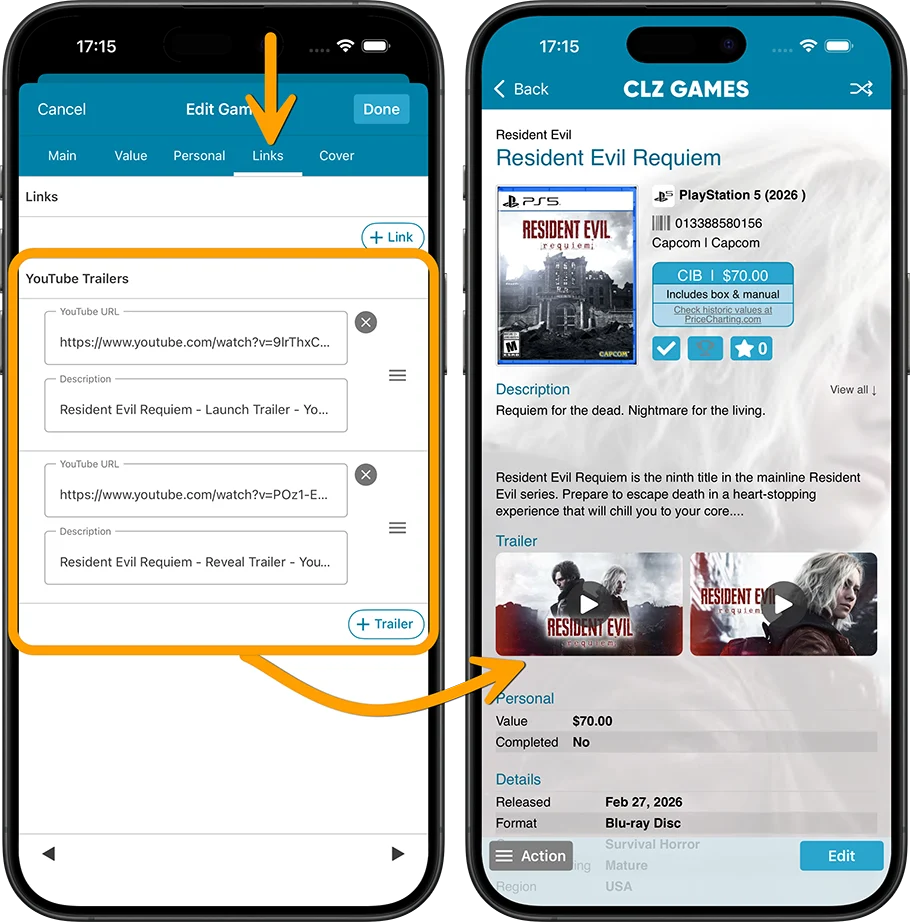
A handy update for CLZ Games! YouTube trailers for games typically come straight from our Core database, but now you can replace the standard Core YouTube trailer with a trailer of your own choice, or add one if we Core didn’t provide one.
Just paste any YouTube URL into your the YouTube trailer link section (Edit Game, then go to the Links tab) and CLZ Gamesautomatically grabs the thumbnail image and video description for you.
Add as many as you like per game, then drag them into your preferred order.
Recent changes
v11.0: Create your own Custom Fields!
Jul 16, 2026
v10.4: Add your own YouTube trailer links
Apr 02, 2026
v10.3: Faster down-syncing from CLZ Cloud
Mar 30, 2026
v10.2: ‘One-by-One’ mode for adding games by barcode
Nov 29, 2025
v10.1: Automatic eBay search links
Oct 09, 2025
v10.0: Catalog your Toys-to-Life figures: amiibo, Skylanders, Disney Infinity, etc…
Jun 10, 2025
v9.6: Security update
Feb 25, 2025
v9.5: Better barcode scanning
Jan 09, 2025
v9.4: New app icon to fit our new company name and logo
Oct 11, 2024
v9.3: Several improvements and fixes
Sep 27, 2024
v9.2.2 New “search for…” suggestions when adding games by title
Aug 07, 2024
v9.0.5 Game values are back in the Add Games screen
Apr 17, 2024
v9.0: Improved Add by Title screen, Collection tabs, Check Value screen and more!
Mar 12, 2024
v8.4: Easier access to Manage Pick Lists tool
Oct 25, 2023
v8.3: Pre-fill screen: Orange highlights and a Clear button
Oct 16, 2023
v8.2.1: New in-app getting started tips
Sep 13, 2023
v8.1: New Sync button on main screen
Sep 06, 2023
v8.0: Use multiple folder levels
May 17, 2023
Youtuber Mystic shows how he is using CLZ Games
Apr 19, 2023
v7.5: More value data from PriceCharting (Graded, Box only, Manual only)
Jul 25, 2022
v7.4 New “Card View”
May 12, 2022
v7.3: Back Cover images!
Mar 29, 2022
v7.2: Progress Bars and Cancel buttons!
Mar 16, 2022
v7.1: Improved Pre-fill screen: choose your own fields!
Feb 04, 2022
v7.0: New features and lots of improvements
Dec 02, 2021