
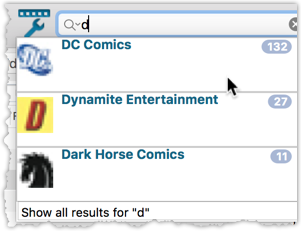
We’ve expanded the quick search box to now also allow “search-as-you-type” with suggestions for pick list fields.
How does it work?
In the quick search box top right of your screen you should see a “dropdown” button. Use this to select which field you wish to perform a search on. If “search-as-you-type” is available for that field, it will instantly work once you start typing in the box.
Example
You can now select the field “Publisher” in the quick search box, start typing a publisher name, and instantly see suggestions (based on what you typed) of publishers you have in your database. Click on a publisher to see all comics of that publisher.
Try it with the “Character” field too! Instantly filter down to all comics have that specific character in them.
Recent changes
v23.6: New report after Updating Key Info
Apr 14, 2023
v23.5: Now supports our new CLZ Scanner barcode scanner app
Mar 29, 2023
v23.4: Three new slab-related fields, plus a new look for slabs!
Mar 14, 2023
v23.3: Improved Pull List and new “Discover” mode!
Jan 04, 2023
v23.2: ReLink Core Variant
Nov 02, 2022
v23.1: Two improvements to the CovrPrice integration
Oct 24, 2022
v23.0: Get comic values from CovrPrice!
Oct 04, 2022
v22.2: Configurable Pre-fill, more configurable Update from Core fields + WebP support
Mar 02, 2022
v22.1: Minor Keys vs Major Keys and Key Categories
Jan 12, 2022
v22.0: Automatic key comic info from Core and lots more
Nov 18, 2021
v21.6 Improved Submit to Core system
Oct 08, 2021
v21.5: Sync web-links with CLZ Cloud
Sep 28, 2021
v21.4: Bar chart in folder panel background
Sep 14, 2021
v21.3: New “Transfer Field Data” tool
Aug 09, 2021
v21.2: New Link Comics with Core screen
Jun 08, 2021
v21.1: Now download values in other currencies
Apr 06, 2021
v21.0.4 Extra Collection Status dropdown button in Add Screen
Mar 17, 2021
v21.0.3 Various improvements and fixes
Mar 04, 2021
v21.0: Add by Issue, Update Values report and a new Missing Comics tool!
Dec 02, 2020
v20.2: Now fully Big Sur compatible
Dec 01, 2020
v20.6 Easier access to the Manage Pick Lists screen
Aug 25, 2020
v20.5: Changing your folder field is now much easier
Jul 30, 2020
v20.4: Faster image downloads, faster Update from Core
Jun 25, 2020
v20.3: Faster Shelves View + 2 new Shelf Styles
Jun 08, 2020
v20.1 Faster CLZ Cloud syncing!
Apr 14, 2020