icon
Comic Collector (Windows)

v17.0.4: Added search-as-you-type to pick list fields

Mar 16, 2017

Search-As-You-Type for pick list fields

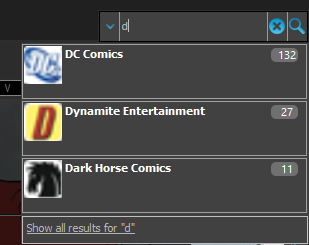
We’ve expanded the quick search box to now also allow “search-as-you-type” with suggestions for pick list fields.

How does it work?

In the quick search box top right of your screen you should see a “dropdown” button. Use this to select which field you wish to perform a search on. If “search-as-you-type” is available for that field, it will instantly work once you start typing in the box.

Example

You can now select the field “Publisher” in the quick search box, start typing a publisher name, and instantly see suggestions (based on what you typed) of publishers you have in your database. Click on a publisher to see all comics of that publisher.

Try it with the “Character” field too! Instantly filter down to all comics have that specific character in them.

Fixes in this version

We also fixed some issues with the program in this version:

  • Images Popup:
    • “size window to picture” showed image slightly smaller
    • .tiff images were not showing
  • Sync with CLZ Cloud: Series with identical Display Names could be confused when down syncing

Recent changes

v23.6: New report after Updating Key Info Apr 14, 2023 v23.5: Now supports our new CLZ Scanner barcode scanner app Mar 29, 2023 v23.4: Three new slab-related fields, plus a new look for slabs! Mar 14, 2023 v23.3: Improved Pull List and new “Discover” mode! Jan 04, 2023 v23.2: ReLink Core Variant Nov 02, 2022 v23.1: Two improvements to the CovrPrice integration Oct 24, 2022 v23.0: Get comic values from CovrPrice! Oct 04, 2022 v22.2: Configurable Pre-fill, more configurable Update from Core fields + WebP support Mar 02, 2022 v22.1: Minor Keys vs Major Keys and Key Categories Jan 12, 2022 v22.0: Automatic key comic info from Core and lots more Nov 18, 2021 v21.6 Improved Submit to Core system Oct 08, 2021 v21.5: Sync web-links with CLZ Cloud Sep 28, 2021 v21.4: Bar chart in folder panel background Sep 14, 2021 v21.3: New “Transfer Field Data” tool Aug 09, 2021 v21.2: New Link Comics with Core screen Jun 08, 2021 v21.1: Now download values in other currencies Apr 06, 2021 v21.0.4 Extra Collection Status dropdown button in Add Screen Mar 17, 2021 v21.0.3 Various improvements and fixes Mar 04, 2021 v21.0: Add by Issue, Update Values report and a new Missing Comics tool! Dec 02, 2020 v20.2: Now fully Big Sur compatible Dec 01, 2020 v20.6 Easier access to the Manage Pick Lists screen Aug 25, 2020 v20.5: Changing your folder field is now much easier Jul 30, 2020 v20.4: Faster image downloads, faster Update from Core Jun 25, 2020 v20.3: Faster Shelves View + 2 new Shelf Styles Jun 08, 2020 v20.1 Faster CLZ Cloud syncing! Apr 14, 2020

Archive