What's new in CLZ Movies Mobile? 2026

Fixed:
- The VHS icon was incorrectly displayed as a DVD icon
- Updating from Core could freeze the app
- After tapping a suggestion from the search in main screen, using Back would make the app go back to the top of the list
- A couple of layouts for foldable devices weren’t displayed correctly when using 3-button navigation

Fixed:
- Slight tweaks to height of certain popups for foldable devices
- Crashes could occur on older devices while syncing/adding items
Fixed:
- Custom Fields: Fixed List/Fixed Button Bar: It wasn’t possible to add more than 1 value
New:
- New layouts for unfolded foldable devices
- Improved support for tablets and desktop-style windowed mode
- Predictive Back gesture support throughout the app
Fixed:
- Pre-fill: changes to the field order were not saved
- Pre-fill: Custom Field data wasn’t saved to newly added entries
Fixed:
- The “Remove unused pick list items” option could crash the app
- Custom Field: Time now supports four-digit hours
- Custom Field folders were not remembered after restarting the app
- Custom Field Preview was not displayed correctly on smaller phones
- The keyboard could not be dismissed when adding or editing a Custom Field
- Some users received too many “Please rate this app” popups
– After updating to v11 movies could be duplicated
– Main screen: Thumbnail size resets after a restart
– Details: Genres are always sorted alphabetically
– Could not dismiss keyboard when adding a Custom Field
– Custom Field Folder is reset after a restart
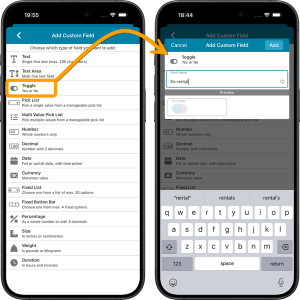 This is it, the big v11.0 update for your CLZ Movies app. Version 11 is a huge step forward in the customizability of the app. And I am not talking about tweaking the look and feel here, like layout, colors, fonts, etc… No… this time we are giving you the ability to actually customize the database itself, with your own “Custom Fields“!
The Custom Fields feature will let you create your own data fields, to catalog any information for which the app does not have a built-in field. You can create text fields, number fields, date fields, Yes/No toggles, pick list fields and much more.
All fields you create can be edited on a special Custom Fields tab of the Edit Movie screen. The entered data will nicely appear in a special section on the movie details page. And of course, you will be able to use the fields like any built-in fields, that is, sort on them, use pick list, date and toggle fields as folders, search your text fields, etc..
 Yes, it has been quite a while since we released updates for the CLZ mobile app. But there is a good reason for that. Most of the CLZ team has been working on our biggest update since years. And its release is very close now!
So here’s a quick heads-up for all users of our CLZ mobile apps: Within 2 weeks, we are going to release major version 11.0 updates for all 5 apps (CLZ Comics, CLZ Movies, CLZ Books, CLZ Music and CLZ Games).
In this version 11, we will introduce an important new CLZ feature, bringing yet another way to customize the app to fit your wants and needs:
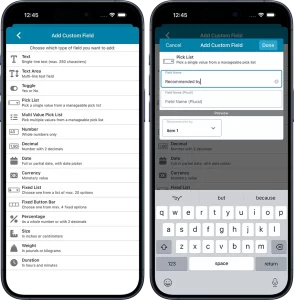
Custom Fields: create your own data fields!
The Custom Fields feature will let you create your own data fields, to catalog any information for which the app does not have a built-in field.
You will be able to use the fields like any built-in fields, that is, sort on them, use custom pick list fields as folders, sync the data to CLZ Cloud, print or export list with the custom fields included, etc…
And, if you are also subscribed to the CLZ Web cloud-based software for your computer: the Custom Fields are available there too, so you can sync your created fields and their data between Web and mobile!
Fixed:
- Sync with CLZ Cloud: Updates: Custom covers did not download correctly
- Sync screen could open when tapping Edit during image downloads
- Details view not fully visible in some cases
- “Downloading images” bar could appear when nothing was downloading
Fixed:
- Further tweaks to the down-syncing from CLZ Cloud
- Add, Edit and Action buttons could sometimes not be used if images were still downloading in the background
New:
- More optimizations for down-syncing with CLZ Cloud
 A little bit of fun news today: We were thrilled to hear CLZ Movies mentioned by actor and playwright Tracy Letts on the latest episode of Blank Check with Griffin & David called The Year of Living Dangerously with Tracy Letts.
Tracy talks about owning movies on disc, so it’s especially nice to hear that he uses CLZ Movies to keep his collection neatly organized!
Tip: You can listen to The Year of Living Dangerously with Tracy Letts right here.
Or check out Blank Check with Griffin & David on your favorite Podcast player app!
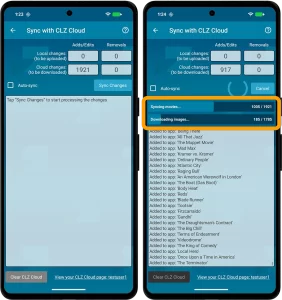 No new features here, but an important improvement to an existing one: the CLZ Cloud syncing. Our mobile developers Pim and Bernard have implemented three changes that will make the down-syncing of new items from the CLZ Cloud to your app a LOT faster!
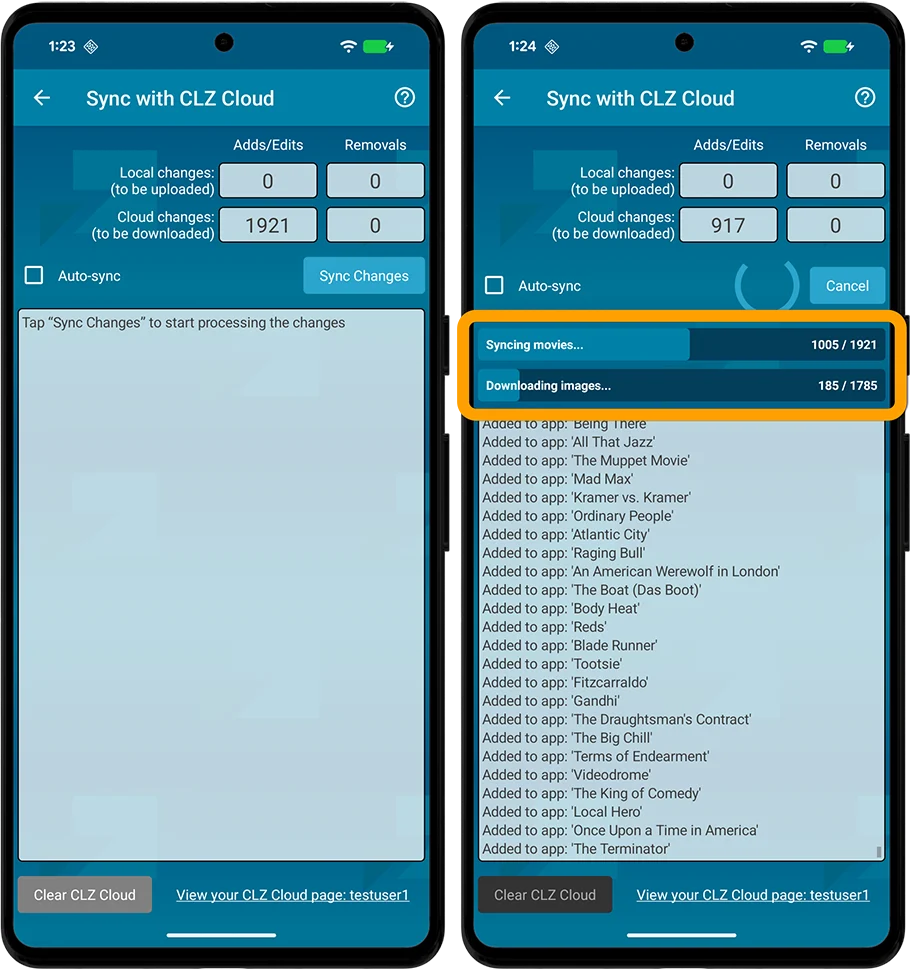
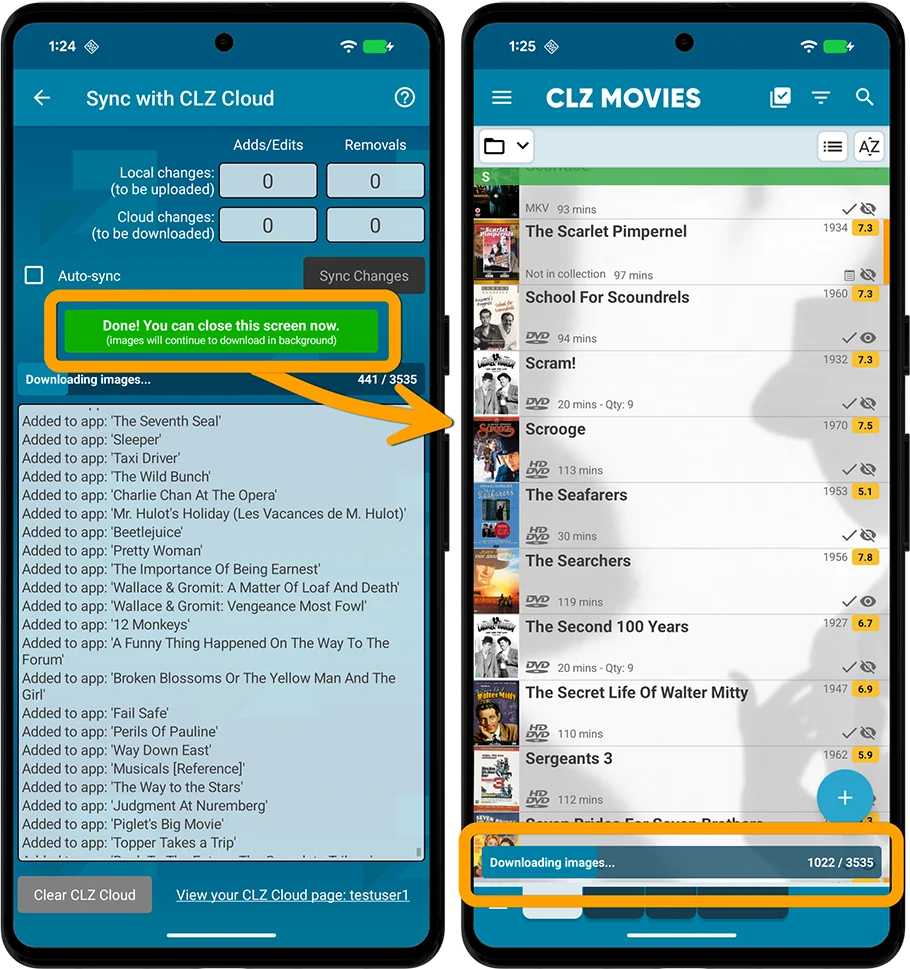
- The syncing now down-syncs the *data* first, while queuing the *image* downloads. This will make the data sync super fast.
- Downloading the images is much quicker too, especially on fast connections, as it downloads multiple images at the same time.
- As soon as the data download has completed, you can close the Sync screen and start using the app. The image downloads will continue at the bottom of the main screen, prioritising images that are “in view”.
The improvement in speed will be most noticeable when re-downloading your complete CLZ Cloud database, e.g.
- After installing the app on a new device
- After removing and re-installing the app
- After Clearing the Database
However, even during normal use, e.g. when syncing between devices, or between the app and the CLZ Web software, you will find the down-syncing to be much faster than before.
Fixed for Android:
- Pre-fill: Watched now has a “Watched/Not Watched” toggle
- Edit screen: New big blue “Mark as Watched” button on the Personal tab for unwatched movies
Fixed:
- Pre-fill: Watched now has a “Watched/Not Watched” toggle
- Edit: Personal: New big blue “Mark as Watched” button on the Personal tab for unwatched movies
- Edit: Links: Tapping next/previous movie while waiting for link description could crash the app
- Trailers weren’t downloaded for the separate entries when adding a box set
Fixed:
- Crash: When a movie couldn’t be located/selected on start-up or after editing the app could crash
- iPad: movies sometimes wouldn’t be scrolled to after picking it from a search in your own collection
- Collection bar at the bottom could disappear on closing the sync screen
- Collection bar didn’t appear immediately when adding a new collection for the first time
Fixed for iOS:
- The scroll position in the list could be wrong after searching in own collection and tapping a result from the suggestions
- Images view: Pinch to zoom in images view was broken
- Edit screen: tapping “next” or “previous” on the Links tab would crash the app
Fixed for Android:
- Scrolling lists / tapping buttons / selecting items in a list / removing items could suddenly stop working
- Covers stayed zoomed in if you navigated out of an item and into another
- Edit screen: Taking a picture for your cover could sometimes remove all other information from that item
- Selecting: Tapping “Select All” in didn’t show items being selected in images view
Fixed:
- A couple of navigation issues