What's new in CLZ Comics Mobile? (page 19)
Adding comics by barcode is most popular feature of the CLZ Comics app, so let’s see if we can make it even better! Today’s version 5.1 is all about barcode scanner:
Improved scan engine
First, we have improved the scan engine and gave it a larger “scan area”. This should help scan barcodes faster and easier.
Automatic scanning of any barcode type
In previous versions, you had to manually set the scan mode (+0 | +2 | +5), depending on the type of barcode you were scanning. But not anymore!
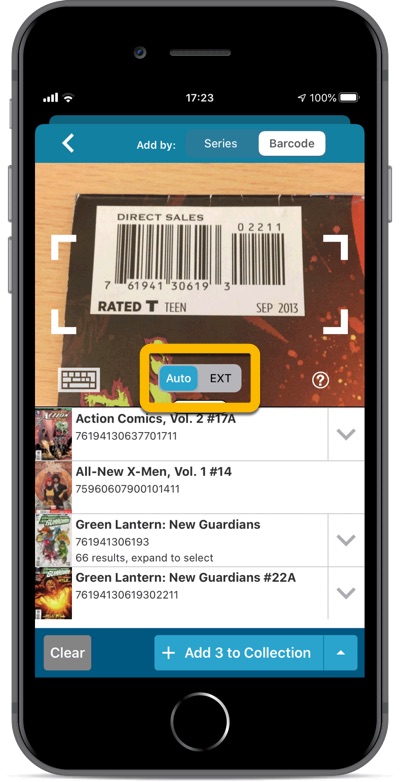
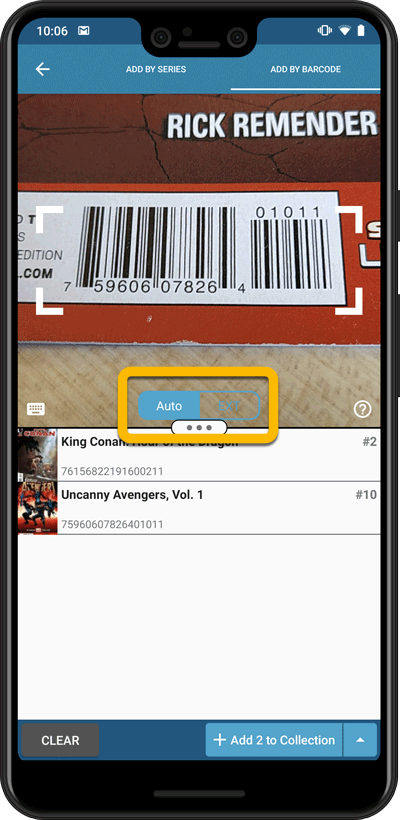
We have made the scanner much smarter now. Just set it to “Auto” and it will automatically scan every barcode you throw at it. It will automatically pick up extensions, whether 2 digits long or 5 digits long. Super easy, super quick.
BTW: in rare cases, the scanner may “give up” on finding the extension too quickly. E.g. with lower quality cameras or in “less than optimal” lighting conditions. In that case, set the scanner to “EXT” mode, which will force it to find the extension.
Adding comics by barcode is most popular feature of the CLZ Comics app, so let’s see if we can make it even better! Today’s version 5.1 is all about barcode scanner:
Improved scan engine
First, we have improved the scan engine and gave it a larger “scan area”. This should help scan barcodes faster and easier.
Automatic scanning of any barcode type
In previous versions, you had to manually set the scan mode (+0 | +2 | +5), depending on the type of barcode you were scanning. But not anymore!
We have made the scanner much smarter now. Just set it to “Auto” and it will automatically scan every barcode you throw at it. It will automatically pick up extensions, whether 2 digits long or 5 digits long. Super easy, super quick.
BTW: in rare cases, the scanner may “give up” on finding the extension too quickly. E.g. with lower quality cameras or in “less than optimal” lighting conditions. In that case, set the scanner to “EXT” mode, which will force it to find the extension.
Fixed:
- Sort title of a series was not generated correctly during adding/editing of a series.
New:
- You can now folder group on 4 extra fields:
- Cover Date Year
- Release Date Year
- Read Date Year
- Purchase Date Year
Fixed:
- Rare incident where timeouts occurred during CLZ Cloud sync.
- Main list cells now show release date instead of cover date.
New:
- You can now folder group on 4 extra fields:
- Cover Date Year
- Release Date Year
- Read Date Year
- Purchase Date Year
Fixed:
- Rare incident where timeouts occurred during CLZ Cloud sync.
- Main list cells now show release date instead of cover date.
Fixed:
- Add by Barcode: For older barcodes sometimes the wrong issue would be pre-selected
- Custom images were uploaded too often
Fixed:
- Add by Barcode: For older barcodes sometimes the wrong issue would be pre-selected
- Custom images were uploaded too often
- The amount of items for each pick list could be wrong
Changed:
- Add by barcode: Swipe to remove a single barcode wasn’t working. To remove a single barcode now, just press and hold on it!
Fixed:
- When changing a cover, the list and images view wasn’t updated correctly
- Date pickers weren’t showing correctly
- Some colours were wrong (tabs/switches)
Instead of working on new features, we decided to take a few weeks to look at existing screens and functionality and see where things could be improved, of course all based on your feedback.
Today’s update brings you new iOS 13 style “sheet” screens and a batch of user interface improvements we implemented (more coming up!):
Instead of working on new features, we decided to take a few weeks to look at existing screens and functionality and see where things could be improved, of course all based on your feedback.
Today’s update brings you the first user interface improvements we implemented (more coming up!):
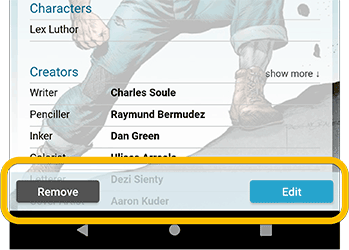
Easier to find Edit and Remove buttons on comic details screen (phone only)
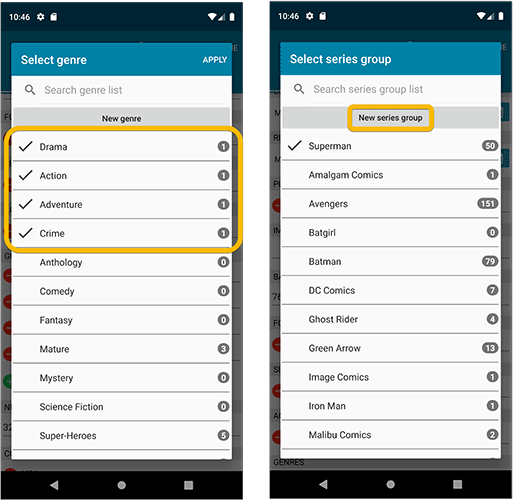
Easier editing of pick list fields, especially multi-value fields
- Selected/checked values are now always at the top
- For multi-value fields (like Genre), check/uncheck multiple values in one go!
- Easier to find big button at the top for adding NEW values..
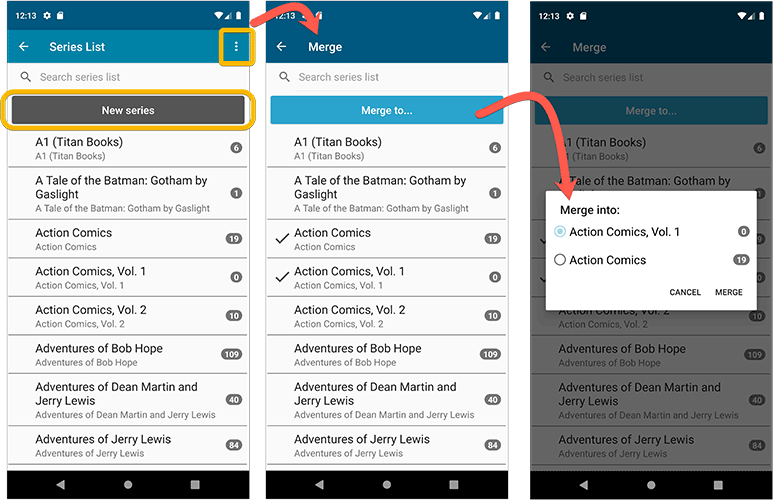
Complete Re-design of Manage Pick List screen
- Easier to find big button at the top for adding NEW values.
- Remove Unused and Merge action have now been moved to action (…) button top right.
- Easier to use Merge mode.
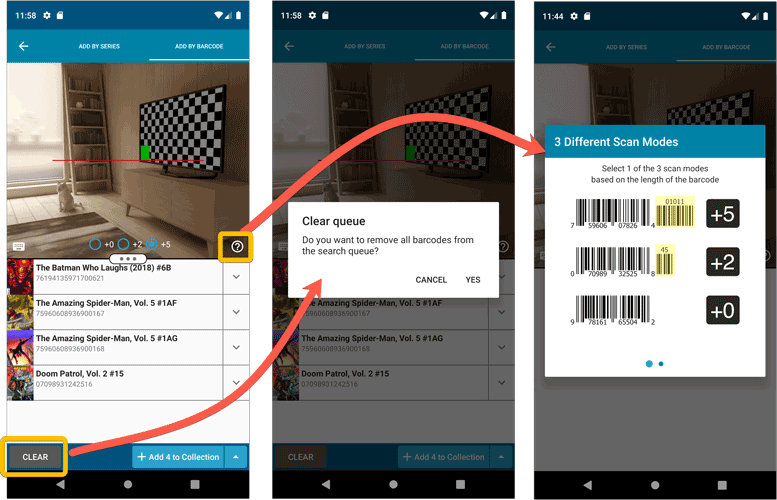
Add by barcode: New Clear Queue button and new “Scanning tips” popup
Other tweaks:
- Re-introduced a “sync changes pending” icon to the “Sync with CLZ Cloud” menu item
Fixed:
- In some cases the recent purchases list in the statistics screen was incorrect.
- Cover price was not downloaded when adding/updating from Core.
Last week, we released CLZ Comics 5.0, of which the most popular new feature was the new automatic comic values tool.
After the release, we immediately started getting questions from many users “Okay, I see the values now, but where can I see the TOTAL value of my collection”?
Of course, we were way ahead of you! Planned for inclusion in the v5.0 release was a cool new Statistics screen, with charts, totals, everything. Sadly, we had to skip this feature because of time constraints, as we really wanted to make our planned v5 deadline.
However, 10 days later, the Stats screen has been finished now, waiting for you in version 5.0.4!
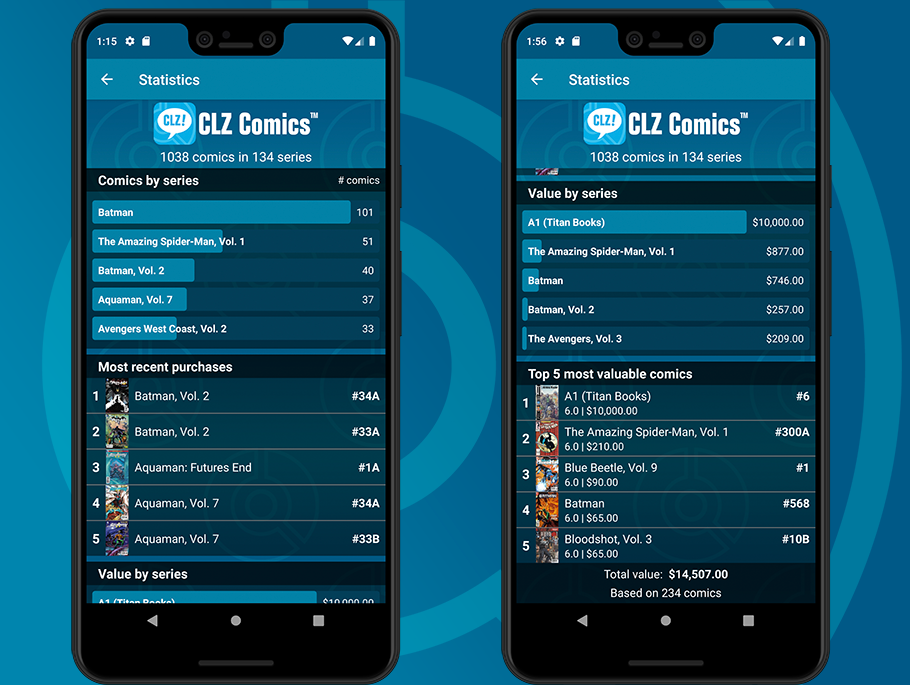
New Statistics screen
A cool “infographic” style screen showing totals and statistics about your comic collection. Find your biggest series, your most recent purchases, your most valuable comics and the value by series and of course, the total value.
Last week, we released CLZ Comics 5.0, of which the most popular new feature was the new automatic comic values tool.
After the release, we immediately started getting questions from many users “Okay, I see the values now, but where can I see the TOTAL value of my collection”?
Of course, we were way ahead of you! Planned for inclusion in the v5.0 release was a cool new Statistics screen, with charts, totals, everything. Sadly, we had to skip this feature because of time constraints, as we really wanted to make our planned v5 deadline.
However, 10 days later, the Stats screen has been finished now, waiting for you in version 5.0.4!
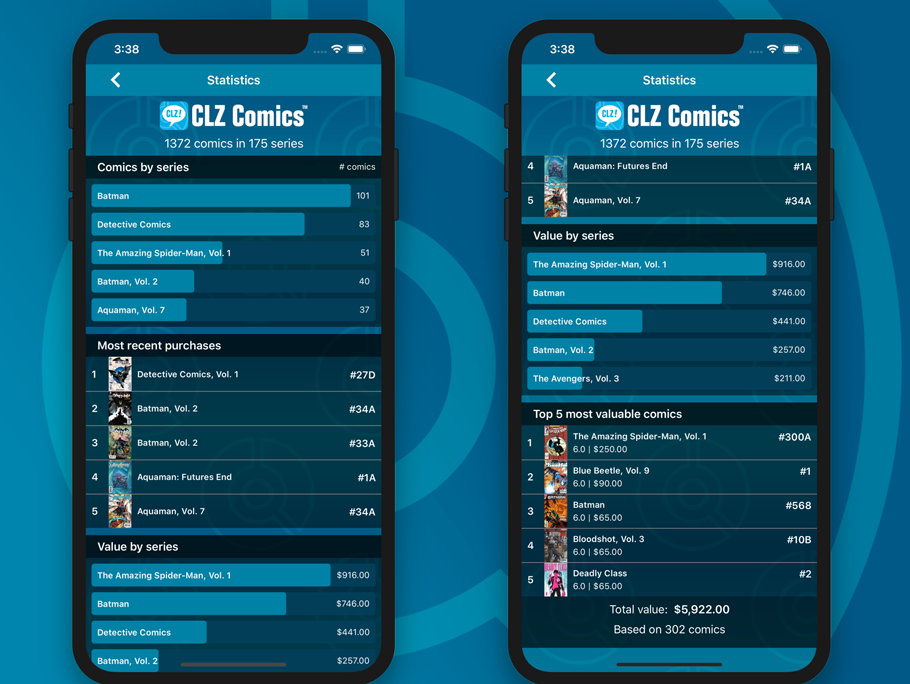
New Statistics screen
A cool “infographic” style screen showing totals and statistics about your comic collection. Find your biggest series, your most recent purchases, your most valuable comics, the value by series and of course, the total value of your collection.
Fixed:
- Purchase store could display twice in the details template
Fixed:
- Add Screen: Year was missing from Search As You Type results
- Add Screen: Barcode results could sometimes be wrongly highlighted in blue
- Edit Screen: Renamed “Issue Title” to “Title”
- Templates: “Star Rating” and “Read It” controls are back (under Personal)
- Main Screen: The quick search dropdown could get stuck on the screen
- Manage Pick Lists: Genres list was missing
- Manage Pick Lists: Removed “Condition” (now Grade)
- Updated a couple of warning pop-ups
Fixed:
- App could get a crash loop when trying to show an empty series folder.
New:
- New setting to always display grade and/or values in list view
- Added default values for the Grading Company field
Fixed:
- Using “Update Values” could time out
- Add to Collection button would sometimes not show in Add by Barcode screen
- Returned the Edit Series button in the Edit Comic screen
- Multiple Collections: Have/Want summaries now only show for the active collection
- Templates: My Rating was missing (now found under Personal)
Fixed:
- Using “Update Values” could time out
- Add to Collection button would sometimes not show in Add by Barcode screen
- Returned the Edit Series button in the Edit Comic screen

CLZ Comics 5.0: Automatic values, more fields, multiple collections and more

It’s finally here, CLZ Comics 5.0. Here’s what’s new in v5:
- CLZ Comics is now a subscription app
Of course, all existing users have been “grandfathered” into a life-time app unlock. - Automatic “slabbed & graded” values from GoCollect
Find the most valuable comics in your collection (premium online service, so requires a subscription). - Lots of new data fields
Grade, Grading Company, Grader Notes, Slabbed vs Raw, Signed By, Is Key Comic, Key Reason, Plot, Nr of Pages, Genres, Country and Language. - Now supports and syncs multiple collections
Create and sync multiple “sub collections” within your database. - Automatic cloud-syncing of your own “custom” images
No more need to manually force “Upload Image to CLZ Cloud”. - Many tweaks to the menu and overall UI
Logo in top bar, clearer Edit/Remove buttons, new Maintenance sub-menu, etc..
CLZ Comics 5.0: Automatic values, more fields, multiple collections and more
It’s finally here, CLZ Comics 5.0. Here’s what’s new in v5:
- CLZ Comics is now a subscription app
Of course, all existing users have been “grandfathered” into a life-time app unlock. - Automatic “slabbed & graded” values from GoCollect
Find the most valuable comics in your collection (premium online service, so requires a subscription). - Lots of new data fields
Grade, Grading Company, Grader Notes, Slabbed vs Raw, Signed By, Is Key Comic, Key Reason, Plot, Nr of Pages, Genres, Country and Language. - Now supports and syncs multiple collections
Create and sync multiple “sub collections” within your database. - Automatic cloud-syncing of your own “custom” images
No more need to manually force “Upload Image to CLZ Cloud”. - Many tweaks to the menu and overall UI
Logo in top bar, clearer Edit/Remove buttons, new Maintenance sub-menu, etc..
Yep, it is finally coming: CLZ Comics 5.0, for both iOS and Android!
ETA: we are currently aiming for Tuesday September 10, but no promises!
Here’s what will be new in Vee Five:
- CLZ Comics will become a subscription app
That is, for new users. Existing users will of course be “grandfathered. - Automatic “slabbed & graded” values from GoCollect
Find the most valuable comics in your collection (premium feature, so requires a subscription). - Lots of new value-related fields
Grade, Grading Company, Grader Notes, Slabbed vs Raw, Signed By, Is Key Comic (yes/no) and Key Reason. - More fields now editable and syncing to/from CLZ Cloud
New editable fields: Plot, Nr of Pages, Genres, Country and Language. - Now supports and syncs multiple collections
Create and sync multiple “sub collections” within your database. - Automatic cloud-syncing of your own “custom” images
No more need to manually force “Upload Image to CLZ Cloud”.
The automatic downloading of SortNames for Series has been broken for a while, causing series like “The Amazing Spider-man” to sort under “T” instead of under “A”.
This has now been fixed!
For existing problem series in your database, just use Manage Pick Lists from the menu to correct the SortNames manually.

New:
- The resizable panels in the add screen now have the same design as the ones in the main screen.
Fixed:
- iPad: Wrong initial panel layout in the main screen when the app is started in landscape mode.
Fixed:
- Add Screen: previews of results could sometimes not be loaded.
A useful update of your app today, that is, if you are using the app on an iPad:
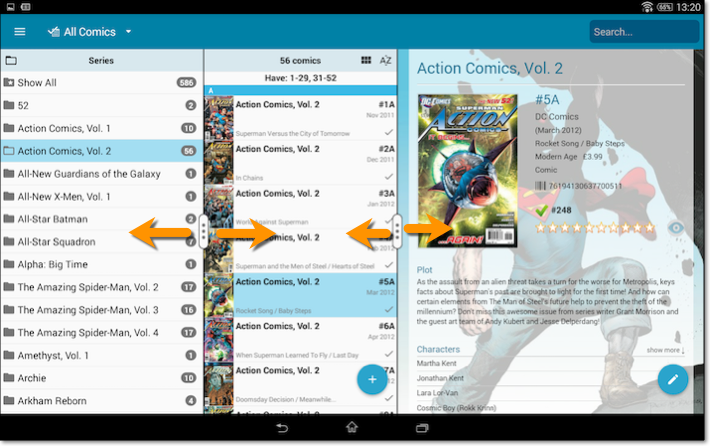
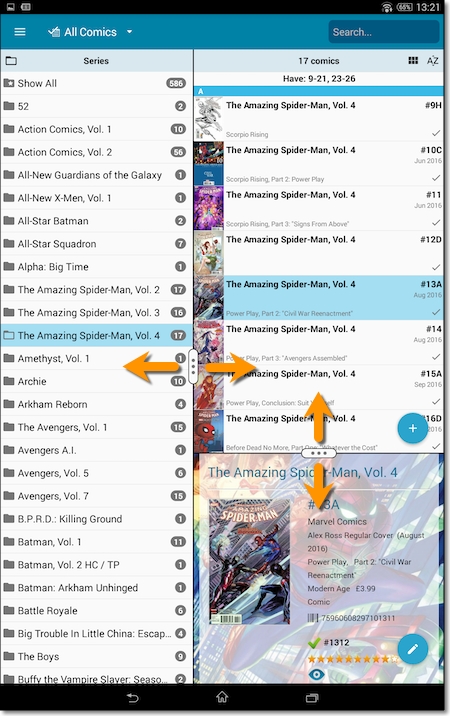
All panels in the main screen (folders, list and details) are now resizable using draggable separators between the panels, so that you can customize the layout to your own liking.
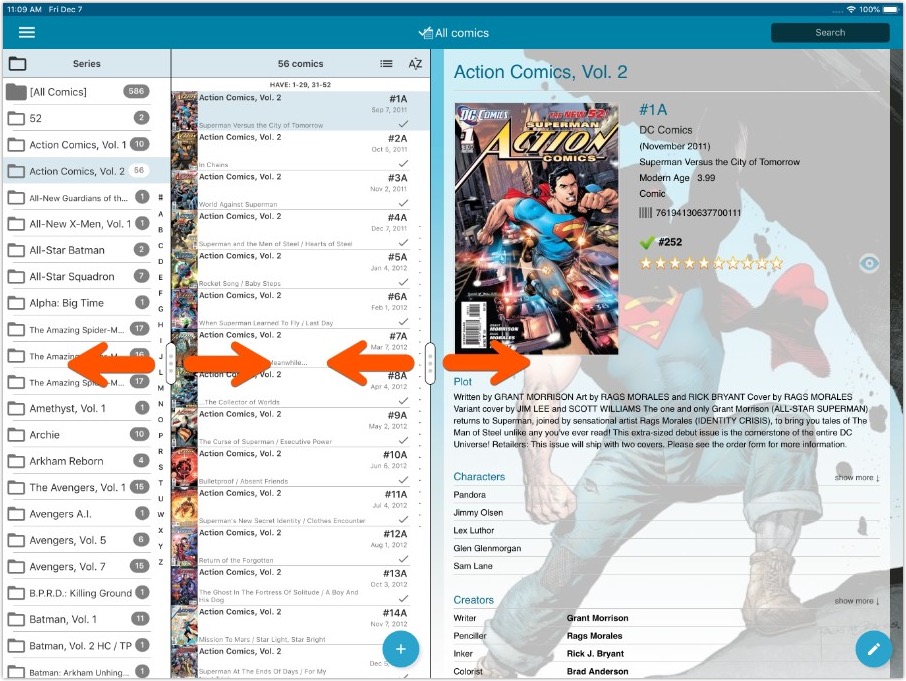
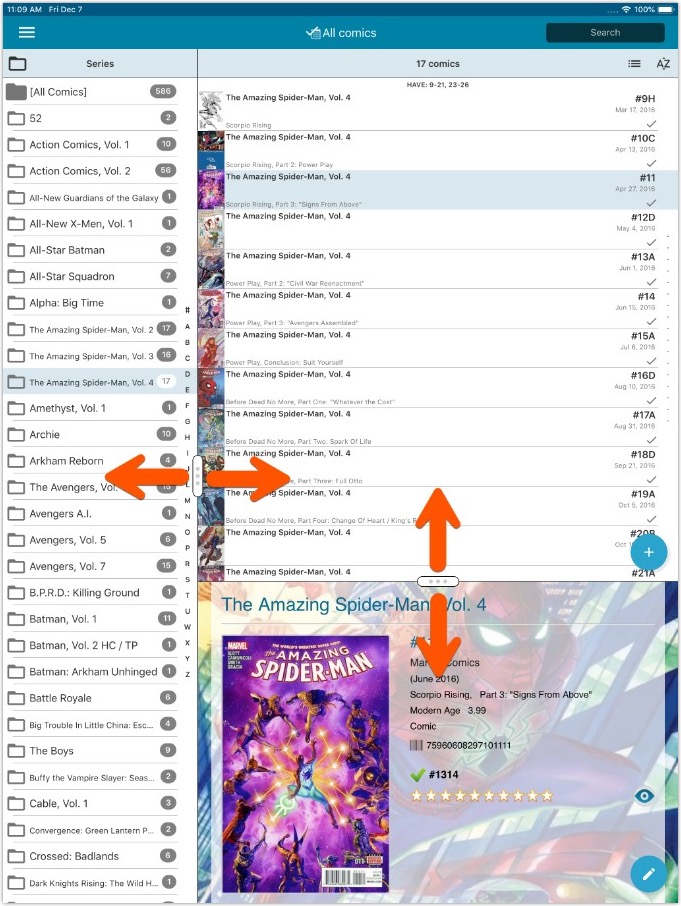
- All panels in the main screen (folders, list and details) are now resizable using draggable separators between the panels, so that you can customize the layout to your own liking.
- The resizable panels in the Add screen have been updated to use the nicer look of the draggable separators.