 The CLZ Music Web software (and the CLZ Cloud site too), has always allowed the Printing and Exporting of album lists. However, a feature that has been frequently requested over the years, is the ability to print and export track lists.
This was technically a bit harder to accomplish, so we postponed implementing this for quite a while. But in the past few weeks, our web developer Joe sat down and made it happen anyway 🙂
And today, we released the feature to your live Web software, for both the Export to CSV tool and the Print to PDF tool.
Export and print track lists
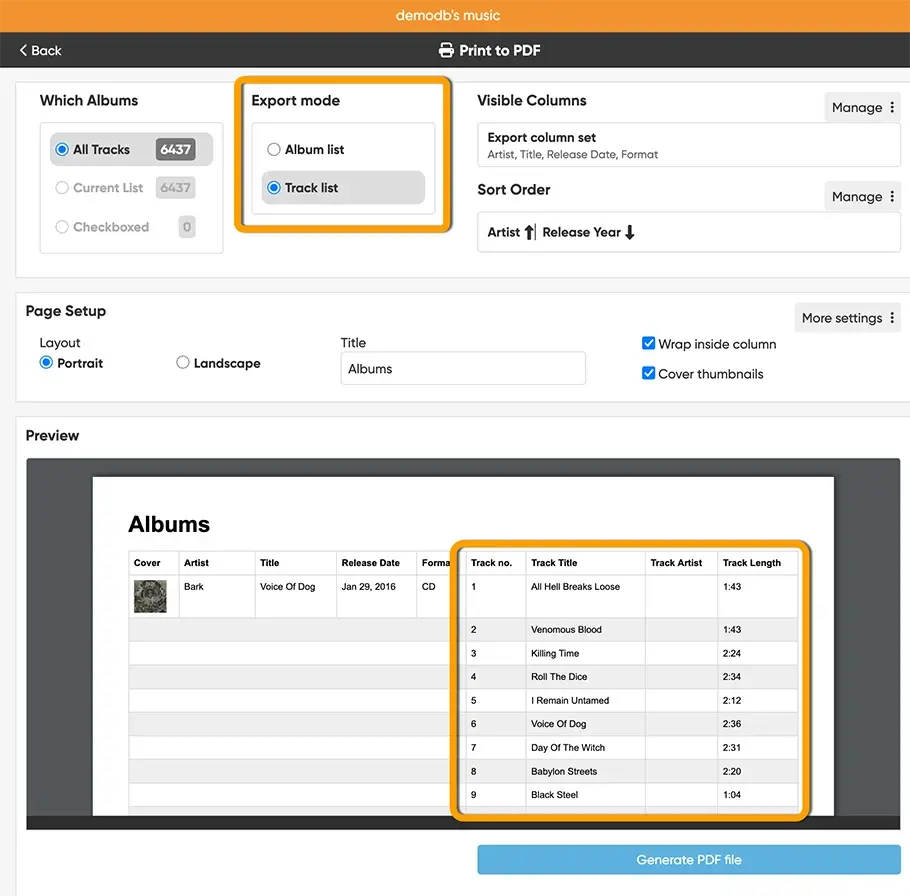
Bot the Export to CSV and the Print to PDF screens now have an extra section at the top left for selecting the “Export Mode”. That lets you switch between “Album list” and “Track list”.
“Album list” is the normal way of exporting/printing albums. “Track list” is the new option for creating track lists.
Once you select “Track list”, two things will happen:
- The exported/printed list will include a row for each track, instead of just one for each album.
- The list will automatically have four extra columns on the right, showing:
- Track index (and disc number for multi-disc albums)
- Track title
- Track artist
- Track length
Note that in the Print to PDF option, the albums fields are printed only once and thus not repeated for each track row, to make for a nice looking and more readable output.
BTW: you can still use the “Visible Columns” Manage button to choose which album fields you want to show first. The track fields are then added automatically behind those columns.