What's new in CLZ Books Web? 2026

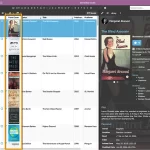 Two nice improvements for CLZ Web in one go. First, you can now add a cover thumbnail as a column in your List View. Next to that, we spent some time improving the keyboard support in the Edit screen.
On top of that, we’ve now also added the possibility to install CLZ Web “as an app” to your computer.
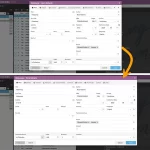 Through the years, the Edit Book screen has evolved a lot. More and more fields were added, distributed over more and more tabs. And recently even more tabs got added for the new Custom Fields and My Images features.
So it’s time to make the amount of tabs more manageable and customizable, with two subtle changes to the Edit Book screen:
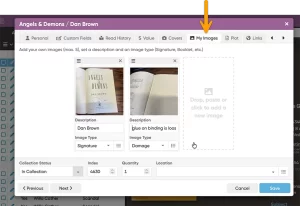 Another big update for your CLZ Books Web software today, which brings further ways to customize your book entries.
This updates adds a new My Images tab, that lets you add up to 5 extra images to each book entry! That is next to the existing customizable Front and Back cover. You can use it to store more images/photos of your collectibles, e.g. of the dust cover, the signature(s), interior art, etc..
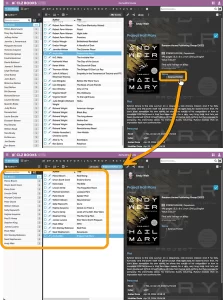 Here’s one suggested by one of our users: “why can’t we just click on a Genre or Subject in the book details and see all books in that category?”
That definitely makes sense, and it makes sense for other fields too! So today we’re releasing a new feature which makes it much easier to move through your collection straight from the details panel: Browsing and deepdiving into your collection just became a lot more fun!
While viewing a book, you can now click on many of the fields in the details panel to instantly find all books in your database that match that same author, illustrator, series, genre, and more.
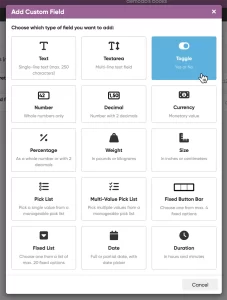 This is it, THE main feature release for 2026. A huge step forward in the customizability of the software. And I am not talking about tweaking the look and feel here, like layout, colors, fonts, etc… No… this time we are giving you the ability to actually customize the database itself!
Yep, today is the launch of the “Custom Fields” feature (previously known as “User Defined Fields”).
The Custom Fields feature will let you create your own data fields, to catalog any information for which the software does not have a built-in field. You can create text fields, number fields, date fields, Yes/No toggles, pick list fields and much more.
All fields you create can be edited on a special Custom Fields tab of the Edit screen and their data will nicely appear in a special section in the book details panel in the main screen. And of course, you will be able to use the fields like any built-in fields, use them as columns, sort on them, use pick list fields as folders, add the fields to printed list, exports, etc..
In April 2025, we introduced one of the biggest new features ever: the automatic downloading of book values. The feature had been requested by many users for years, so the introduction of this feature was a huge success: Most users loved the new values!
However, a small group of users absolutely hated the new feature. They found the values annoying, not necessary, too “commercial”, irrelevant, etc…
We did not see that coming…. our fault. Maybe with our years of experience as software developers, we could have expected this. Guess we were too excited about the feature ourselves 🙂
Looking back, we should have made the entire feature optional from the start.
Of course, making it optional is still possible and that is exactly what we did for this update today. If you don’t want automatic values for your books, you can now disable downloading them via the new “Download Values” checkbox in the Settings screen (menu top left, then click Settings)
When you disable this setting, no book values will be downloaded anymore for any future books you add. On top of that it will also remove all automatic values you already have (any “My Values” you have will remain).